Adding AI analysis to a trading VPS costs less than $1 per month in API fees for most use cases. A daily pre-session briefing from GPT-5 mini runs roughly $0.01 per month. Even heavy continuous sentiment monitoring across 75 news items per day stays under $11 per month with premium models. The cost barrier that traders expect does not exist.
The real barrier is infrastructure. Running a Python process alongside MetaTrader on the same Forex VPS means sharing RAM, CPU, and network bandwidth between two workloads that were never designed to coexist. A lightweight API-calling script adds 100 to 150 MB of RAM overhead and negligible CPU load. A local NLP model like FinBERT adds 2 to 4 GB. A quantized 7B language model saturates every available CPU core during inference and will freeze your charts and delay your order execution. The difference between these workloads spans three orders of magnitude, and choosing the wrong one for your VPS tier turns an analytical advantage into an execution liability.
This article covers what AI trading tools actually exist today (not marketing claims, actual products with documented functionality), how to connect them to MetaTrader on a VPS using the Flask/FastAPI local server pattern that the MQL5 developer community has standardized around, what VPS tier each workload combination requires with specific RAM budgets, and what can go wrong when AI processing competes with trade execution for server resources. Resource figures draw from verified benchmarks, MQL5 marketplace product data, current API pricing as of March 2026, and community implementation reports. Where a figure comes from a single source or a commercially interested party, that context is noted.
What AI trading tools actually exist today
The term “AI trading tool” covers everything from a $30 indicator that runs a moving average crossover to a genuine LLM-integrated EA that sends market data to GPT-5 and receives structured analysis. The distinction matters for infrastructure planning because the resource profiles differ by orders of magnitude. What follows are tools with documented functionality, not marketing claims.
Three MetaTrader-integrated EAs currently connect to external LLM APIs during runtime. ARIA Connector EA (MQL5 Marketplace, MT5) sends trend data, indicator values, and key price levels to the OpenAI API, then returns a technical report with BUY/SELL/WAIT recommendations and confidence scores. Query frequency is configurable from once per minute to once every four hours. It requires a continuously running MT5 terminal, making it a natural VPS workload. Estimated API cost per analysis is $0.001 to $0.005. ClearAI EA (MQL5 Marketplace, MT5) takes a different approach, using the Anthropic Claude API for sentiment analysis across five sources, with a live chat panel inside the MT5 terminal. It requires an Anthropic API key and continuous operation. AI Trading Connection Expert (MQL5 Marketplace, MT5, free) connects to both ChatGPT and Claude APIs for analytical queries, with an explicit disclaimer that it performs no trade executions. All three require an active API key and a terminal that stays running, which is the infrastructure argument for a VPS over a home PC.
Broker-integrated sentiment platforms occupy a separate tier. Acuity Trading, which won the ForexBrokers.com 2026 Best Sentiment Analysis Provider award, uses NLP across millions of news articles to generate sentiment scores via its NewsIQ, AnalysisIQ, and EventIQ products. It offers an MT4/MT5 plugin and is sold B2B to brokers including Tickmill, TMGM, and OneRoyal. Retail traders access it free through participating brokers. The plugin benefits from continuous VPS operation because sentiment updates stream throughout the trading day. FXSSI aggregates retail positioning data from multiple brokers and offers MT4/MT5 indicators (Current Ratio, Order Book, Stop Loss Clusters) at $15 to $50 per indicator.
For traders building their own analysis pipelines, Python-based NLP tools run on a VPS alongside MetaTrader. FinBERT (ProsusAI, Hugging Face) is the most widely used financial sentiment model, fine-tuned on financial text and capable of CPU-only inference at 2 to 4 GB of RAM. Research shows ChatGPT outperformed FinBERT by 35% on forex headline sentiment classification, which is relevant to the cloud-vs-local decision covered in the next section. FinVADER enhances the standard VADER sentiment analyzer with approximately 7,300 financial terms. It runs 339x faster than FinBERT but achieves only roughly 56% accuracy on financial text. RAM consumption is under 100 MB, making it the lightest option for VPS deployments where speed matters more than precision.
One pattern worth noting: MetaEditor has included an AI coding assistant since Build 3800 (June 2023), powered by OpenAI. It helps write MQL5 code but provides no runtime trading assistance. Community consensus from the MQL5 forum thread on this feature (95+ pages) is that it is helpful for boilerplate but produces frequent errors in MQL-specific syntax.
Most MQL5 marketplace EAs labeled “AI” use traditional indicators with marketing language. Genuine LLM-integrated products like ARIA Connector and ClearAI are exceptions. An MQL5 blog post from February 2024 documented the problem directly: many vendors claim ChatGPT integration backed by impressive backtests, but WebRequest() is disabled in the Strategy Tester, making such backtests impossible. If an AI EA shows backtested results, the AI component was not active during that test.
Cloud APIs vs local inference: the infrastructure decision
Every AI trading tool on a VPS ultimately runs through one of two architectures: sending data to a cloud API and receiving results, or running a model locally on the VPS itself. The infrastructure implications of this choice are not a matter of degree. They are categorically different workloads that determine whether your VPS can sustain both AI analysis and live trading simultaneously.
Cloud API calls are network-bound operations. The Python process imports requests or a provider SDK, constructs a prompt with market data, sends an HTTPS POST to OpenAI, Anthropic, Google, or another provider, and waits for the response. During the wait (typically 1 to 5 seconds for a complex analysis), the Python process consumes near-zero CPU and holds roughly 80 to 150 MB of RAM for the interpreter plus imported libraries. The actual computation happens on the provider’s GPU clusters, not on your VPS. When the response arrives, the script parses the JSON and writes the result to a file or serves it to the EA. Total CPU impact on the VPS: under 5%, sustained. This workload coexists with MetaTrader without measurable interference.
Local inference is a fundamentally different proposition. Running a quantized 7B parameter model through llama.cpp on CPU requires approximately 5 to 6 GB of RAM just for the model weights. During generation, the inference process saturates every available CPU core. Simon Willison documented 748% CPU usage on an 8-core system running a 13B model. A 7B model behaves similarly, consuming 100% of all cores for seconds to minutes per response depending on output length. Generation speed on CPU-only hardware ranges from 1 to 5 tokens per second, meaning a 200-token analysis takes 40 seconds to two minutes of sustained full-core saturation. During that window, MetaTrader cannot process ticks reliably, chart rendering freezes, and OrderSend() latency spikes unpredictably. This is not a theoretical risk. It is the expected behavior of CPU-bound inference on shared hardware.
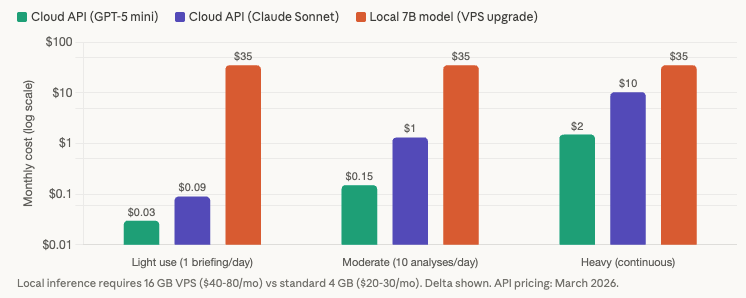
The economics reinforce the architectural conclusion. A quantized 7B model on a VPS requires upgrading from a standard 4 GB plan ($20 to $30 per month) to a 16 GB plan ($40 to $80 per month) for the RAM alone. The upgrade delta of $20 to $50 per month buys inferior output quality compared to cloud APIs (a 7B model does not match GPT-5 or Claude Sonnet on financial analysis tasks) and painfully slow generation that actively degrades trading. GPU VPS options exist but are wildly uneconomical for individual traders: a RunPod T4 instance runs approximately $290 per month, an RTX 4090 approximately $530 per month.
Compare that to API costs for equivalent or superior quality. At current March 2026 pricing, a daily pre-session briefing using GPT-5 nano costs $0.003 to $0.09 per month. Moderate use with 10 trade analyses per day stays under $1.50 per month even with premium models. Heavy continuous monitoring with 75 news items per day and 50 queries per day costs $0.10 to $10.32 per month depending on model choice. The break-even point where local inference becomes cheaper than API calls is approximately 10 million tokens per month, roughly 50 to 100 times the heaviest realistic retail trading scenario. For individual forex traders, the math is not close. API calls are overwhelmingly the better value proposition.
Rate limits are a non-issue at these volumes. OpenAI Tier 1 (requires $5 total spend to unlock) allows 500,000 tokens per minute for GPT-5.4 and 2 million for mini models. Anthropic Tier 1 allows 50 requests per minute. The heaviest trading scenario peaks at 5 to 10 requests per minute during high-impact news events, well within the lowest available tier.
The infrastructure recommendation is unambiguous: use cloud APIs for AI analysis on a trading VPS. Reserve local inference for offline research on a separate machine or for the rare trader running a 16 GB VPS with strict CPU affinity isolation and scheduled inference exclusively during non-trading periods.
VPS tier planning with AI workloads
The previous section established that cloud APIs are the right architecture for most traders. This section maps the specific RAM and CPU budgets for running AI tools alongside MetaTrader at each VPS tier. The numbers assume optimized MetaTrader settings (max bars reduced to 5,000 to 10,000, Market Watch cleaned to traded pairs only, as covered in our MT4 VPS optimization guide).
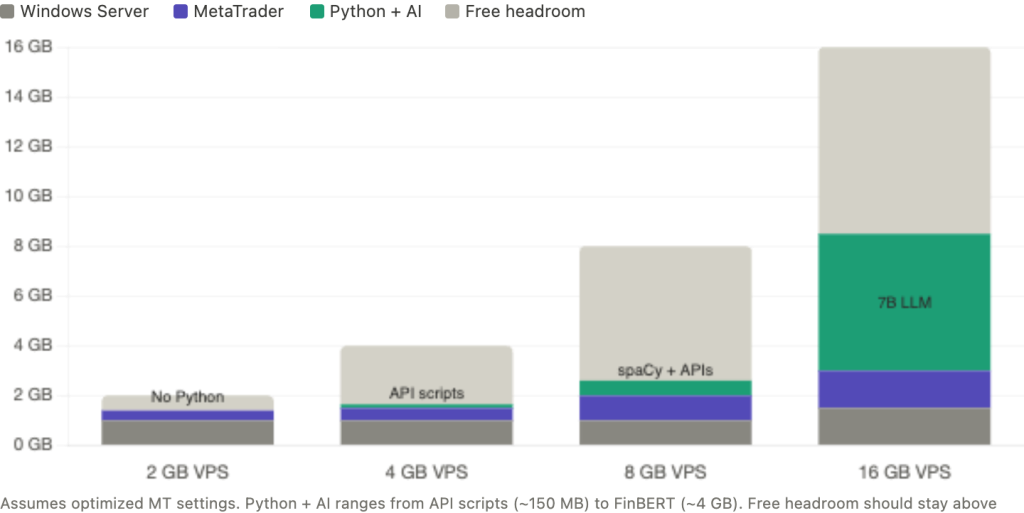
A 2 GB VPS leaves no room for Python. Windows Server consumes 800 MB to 1.2 GB at idle. A single lean MT4 terminal with one chart and one EA adds 200 to 400 MB. That leaves roughly 400 to 1,000 MB, which sounds workable until you account for the 25% free RAM headroom that prevents swap thrashing during tick volume spikes. The only AI option at this tier is WebRequest() calls directly from within the EA to an external API, which adds no separate process overhead. The EA constructs the prompt, sends the HTTPS request, and parses the response entirely within MetaTrader’s existing memory footprint. The limitation is significant: WebRequest() is synchronous and blocks the EA’s execution thread until the response arrives. A 3-second API call means 3 seconds where your EA cannot process ticks or send orders. For EAs that trade infrequently on higher timeframes, this is acceptable. For anything monitoring fast markets, it is not.
A 4 GB VPS is the entry point for running Python alongside MetaTrader. After Windows (800 MB to 1.2 GB) and one MT4 or MT5 terminal (300 to 600 MB depending on platform and configuration), approximately 2.2 to 2.9 GB remains. A Python interpreter with requests and pandas imported consumes roughly 80 to 150 MB. This leaves comfortable headroom for a Flask or FastAPI local server handling cloud API calls, a VADER or FinVADER sentiment script (under 100 MB additional), or a scheduled Task Scheduler script running pre-session analysis. Loading spaCy’s smallest English model (en_core_web_sm) is possible but tight, adding approximately 150 to 250 MB on top of the Python baseline. FinBERT does not fit at this tier. Running two MT4 terminals plus Python pushes past the safe threshold.
An 8 GB VPS is the sweet spot for traders who want meaningful AI capabilities alongside their trading. After Windows and one to two MT5 terminals, approximately 5 to 5.9 GB remains. This accommodates the full Python data science stack: pandas, requests, spaCy with the medium English model (en_core_web_md adds approximately 500 to 600 MB), and all cloud API integrations running simultaneously. Multiple scheduled analysis scripts, a persistent Flask server for real-time EA queries, and a Telegram notification pipeline all fit within the RAM budget. A tiny quantized 3B model (2.5 to 3 GB RAM) technically fits in memory but would saturate the CPU during inference, making it unsuitable alongside live trading. The 8 GB tier handles every cloud-based AI workflow a retail trader is likely to build.
A 16 GB VPS opens local inference as a possibility, though CPU remains the binding constraint. After Windows and two to three MT5 terminals, approximately 12 to 13.5 GB remains. A quantized 7B model via llama.cpp occupies 5 to 6 GB, leaving ample RAM. The problem is execution: inference saturates all available cores for seconds to minutes, and no amount of RAM prevents that. The mitigation is strict CPU affinity isolation, pinning MetaTrader to cores 0 and 1 while restricting Python and llama.cpp to cores 2 and 3 on a 4-core VPS. Even with this isolation, inference should be scheduled during off-peak periods or the weekend market close, never during active trading sessions. For traders who want local models purely for offline research and weekend strategy development, this tier works. For traders running local inference alongside live EAs, the CPU contention risk is real and cannot be fully eliminated through configuration.
The pattern across all tiers points to one consistent finding: RAM determines which AI tools fit, but CPU determines whether they can run safely alongside live trading. Cloud API calls consume minimal CPU and coexist with MetaTrader at every tier from 4 GB upward. Local inference consumes maximal CPU and conflicts with MetaTrader at every tier regardless of RAM.
Connecting Python to MetaTrader on VPS
The most popular integration pattern in the MQL5 developer community is a local HTTP server. Python runs a Flask or FastAPI application on the VPS, typically at http://127.0.0.1:5000/analyze, and the EA calls it via WebRequest(). The “Price Action Analysis Toolkit (Part 36)” MQL5 article documents a complete production implementation: a Flask server running a scikit-learn model, polled by the EA every 60 seconds, returning JSON signals with BUY/SELL/WAIT recommendations, confidence scores, and SL/TP levels. Localhost response time is under 50ms, compared to 1 to 5 seconds for external API calls. This pattern sidesteps every known WebRequest() limitation with external APIs because the EA communicates only with a local endpoint, and the Python server handles all external API calls, JSON parsing, NLP processing, and error handling with the full Python ecosystem available.
For VPS persistence, wrap the Flask or FastAPI server as a Windows service using NSSM (Non-Sucking Service Manager). NSSM provides auto-restart on crash and boot-time startup without requiring a user login session, solving the same problem that Autologon solves for MetaTrader. The server starts before the trader connects via RDP and survives disconnections.
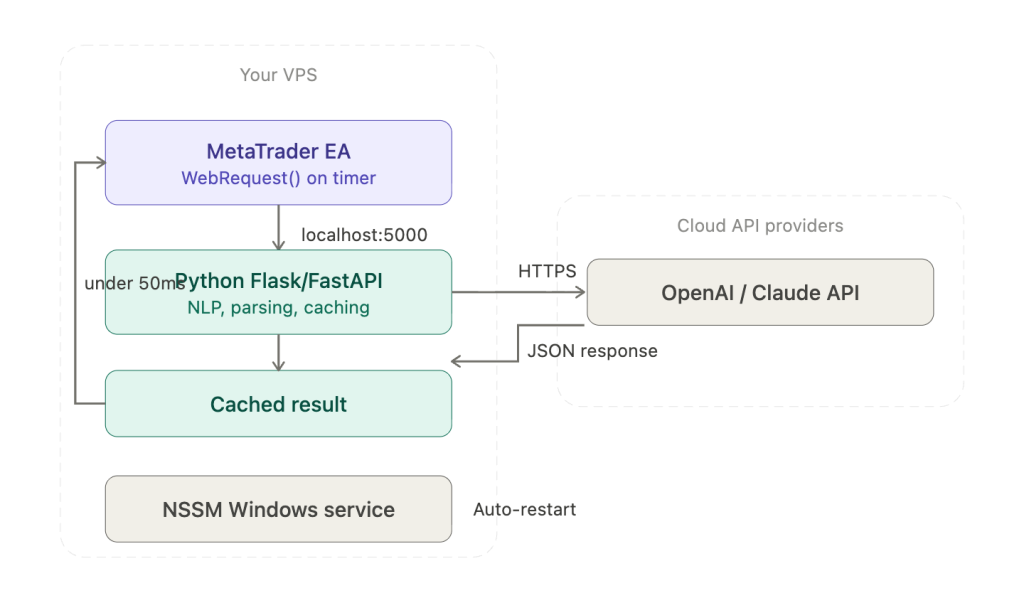
WebRequest() itself has limitations that the local server pattern avoids but that traders using direct API calls from EAs must understand. The function is synchronous and blocking: it halts the EA’s execution thread until the response arrives or the timeout expires, which can reach 30 seconds on a failed connection. Only EAs and scripts can call it, not indicators. URLs must be manually whitelisted in Tools, then Options, then Expert Advisors. MQL5 has no native JSON parser, forcing developers to extract fields with StringFind and StringSubstr or use community-built parsing frameworks. Most critically, multiple MQL5 forum threads document a header truncation bug where newer OpenAI API keys (the “sk-proj-…” format, 130 to 160 characters) are silently dropped by WebRequest(), causing persistent 401 authentication errors with no useful error message. No official fix has been documented. The local Python server pattern eliminates this problem entirely because the Python requests library handles authentication headers without length restrictions.
Four alternative integration methods exist, each with different tradeoffs. The ZeroMQ bridge (documented by Darwinex as the DWX connector) offers sub-millisecond local inter-process communication where the EA acts as a ZeroMQ server and Python strategies connect as clients. It is the highest-performance option but requires DLL compilation and substantially more complex setup. File-based communication is the simplest approach: Python writes signal data as CSV to MT5’s sandbox directory (MQL5/Files/), and the EA polls periodically using FILE_SHARE_READ and FILE_SHARE_WRITE flags for concurrent access. It works reliably for pre-session batch processing where the Python script runs once and writes results before the EA needs them. The official MetaTrader5 Python package (pip install MetaTrader5) uses named pipes to connect Python to the terminal, supporting account information, OHLCV data, tick retrieval, and order management. It is Windows-only and requires the terminal to be running. MQL5’s native SocketCreate and SocketConnect functions provide direct socket communication documented in the MQL5 article “MetaTrader 5 and Python integration: receiving and sending data.”
For the Python installation itself, use vanilla Python from python.org (approximately 30 MB) or Miniconda (approximately 80 MB). Do not install Anaconda, which consumes roughly 3 GB and ships with hundreds of packages unnecessary for a trading VPS. Use virtual environments via venv to isolate dependencies. Windows Task Scheduler handles periodic scripts such as pre-session analysis batches. NSSM handles persistent services such as the Flask server.
WSL2 is not recommended on a trading VPS. Clock drift between the WSL2 kernel and Windows affects API authentication timestamps. WSL2 does not auto-start on boot without workarounds, networking runs through a virtual adapter that adds complexity, and the Linux kernel consumes additional RAM. Docker Desktop is similarly unsuitable: it requires WSL2 or Hyper-V, carries licensing costs for commercial use, and adds 2 to 4 GB of memory overhead. Freqtrade’s own documentation warns against Docker on Windows for production deployments. If containerization is genuinely needed, run the AI workload on a separate Linux VPS.
Scheduling AI analysis around the trading day
How you schedule AI analysis determines whether it interferes with trade execution. The three patterns differ not in what they analyze but in when the VPS bears the processing load relative to active trading.
Pre-session batch processing is the safest approach and the one most compatible with constrained VPS resources. A Python script runs via Windows Task Scheduler at fixed times before each major session: 06:30 UTC for London preparation, 12:30 UTC for New York preparation, 21:30 UTC for end-of-day review. The script fetches recent price data via the MetaTrader5 Python library, constructs a prompt with overnight developments and upcoming economic events, calls the LLM API, and writes the analysis to a CSV file in MT5’s sandbox directory (MQL5/Files/). The EA reads the signal file at session open. The entire Python process runs for 10 to 30 seconds, finishes, and exits before the session begins. During live trading hours, no AI process is running and no CPU or RAM is consumed beyond MetaTrader itself. API costs are minimal because only one to three calls per day are made. This pattern works on a 4 GB VPS with no resource contention whatsoever.
Event-driven analysis triggers AI processing in response to specific market events rather than on a fixed schedule. MQL5 provides built-in CalendarValueHistory() and CalendarEventById() functions that let an EA detect upcoming high-impact economic releases. A practical implementation: the EA checks the calendar every 5 minutes, detects that NFP is 30 minutes away, and sends a WebRequest to the local Flask server asking for a pre-event analysis of current positioning, historical NFP reactions, and relevant sentiment. The Python server calls the LLM API, processes the response, and returns a structured analysis to the EA. The processing burst lasts a few seconds and occurs only before significant events, typically 5 to 15 times per trading week. CPU and RAM impact is negligible because the workload is both brief and infrequent.
Continuous monitoring is the most capable pattern and the one that requires the most careful implementation. The Flask server runs persistently via NSSM, and the EA polls it via OnTimer() at 30 to 60 second intervals. The server can maintain a rolling sentiment score across news feeds, track positioning changes, or monitor multiple pairs for specific conditions. The risk is specific and well-documented: WebRequest() blocks the EA’s execution thread until the response arrives. If the Flask server is mid-API-call when the EA polls, the EA waits, potentially missing ticks during fast markets. The mitigation is architectural rather than configurational. The Python server pre-computes and caches its analysis results on its own schedule, updating them asynchronously. The EA’s WebRequest call fetches only the cached result, which the Flask server returns in under 50ms from memory. The EA never waits for an external API call to complete. This decoupling turns a blocking network call into a near-instant local read, but it requires the developer to build the caching layer rather than passing requests through directly.
The scheduling choice maps directly to VPS tier requirements. Pre-session batch processing adds zero sustained overhead and works at 4 GB. Event-driven processing adds brief, infrequent bursts and works at 4 GB. Continuous monitoring with a persistent Flask server adds approximately 80 to 150 MB of sustained RAM and works at 4 GB for cached-result architectures or 8 GB if the Python process also runs local NLP models like spaCy alongside the API calls.
What can go wrong: latency, hallucination, and security
This section exists because no AI trading tool article should ship without it. The infrastructure risks are real, documented, and specific to VPS deployments.
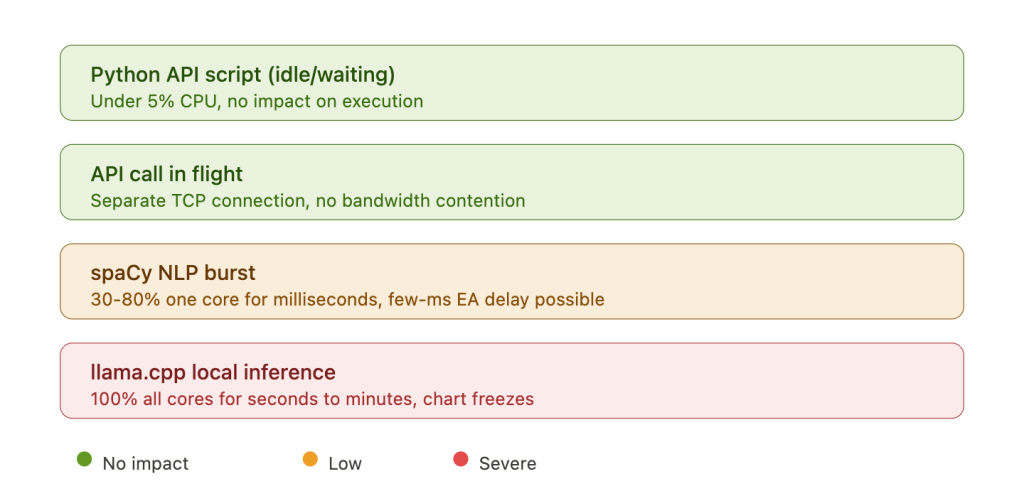
The latency impact of AI workloads on trade execution depends entirely on the workload type. A Python script waiting on an API response consumes near-zero CPU and has no measurable effect on MetaTrader’s tick processing or order execution. An API call in flight uses a separate TCP connection from MetaTrader’s broker connection and does not compete for bandwidth on any modern VPS plan. A spaCy NLP processing burst spikes one CPU core to 30 to 80% utilization for milliseconds to seconds per document, potentially introducing a few milliseconds of delay to EA tick processing. This is low severity and unlikely to affect any strategy except the most latency-sensitive scalping. A llama.cpp inference run is categorically different: it saturates 100% of all available CPU cores for seconds to minutes, causing chart freezes, journal write delays, and unpredictable OrderSend() latency spikes. The mitigation for the first three workloads is straightforward: set MetaTrader’s process priority to High in Task Manager (confirmed recommendation from HostStage, FXVPS, and MyForexVPS). The mitigation for local LLM inference requires CPU affinity isolation and scheduling discipline, and even then the risk cannot be fully eliminated on shared-core VPS hardware.
LLM hallucination is not a theoretical concern in trading contexts. LLMs can fabricate market data, invent earnings reports for companies that do not exist, and generate plausible-sounding analysis built on incorrect facts. BizTech Magazine documented cases where LLMs incorrectly reported missed earnings targets based on non-existent press releases. A viral 2025 experiment where a trader used ChatGPT for options trading initially produced 17 out of 18 winning trades, but the trader later admitted that ChatGPT started fabricating data and the system stopped working. University of Florida professor Alejandro Lopez-Lira told Morningstar that research results on AI trading performance “are much more optimistic than what the performance in reality would be with a reasonable investment size.” JPMorgan Chase, Wells Fargo, and Goldman Sachs have all banned internal ChatGPT use for these reasons. The infrastructure implication is practical: any EA consuming LLM output should treat it as analytical input requiring human review, not as an execution signal. Building automated trade execution on top of LLM analysis without human verification is an architecture that compounds hallucination risk with real capital.
Security on a trading VPS running AI tools introduces attack surface that pure MetaTrader deployments do not have. The most common vulnerability is hardcoded API keys in EA source code. In one documented ForexFactory incident, a trader posted complete MT4 error logs containing their full OpenAI API key publicly on the forum. Truffle Security research from February 2025 found approximately 12,000 live API keys embedded in LLM training datasets. The financial risk is not hypothetical: “LLMjacking” operations that steal API keys have caused individual bills to spike from $2 per month to over $10,000 in half a day. Store API keys in environment variables or encrypted configuration files, never in source code. For traders on EU-based VPS servers, sending trade data to US-based LLM APIs raises GDPR data privacy questions that have not been tested in court but represent a compliance consideration for professional fund managers and prop firm operators.
The backtesting limitation deserves specific emphasis because it undermines a category of marketing claims. WebRequest() is disabled in MT5’s Strategy Tester. Any EA that depends on external API calls for its trading logic cannot be backtested. MQL5 community members have documented that vendors claiming ChatGPT-integrated EAs with backtested results are misrepresenting their products. If an EA’s decision logic depends on an LLM response that cannot be simulated in the tester, its historical performance claims are structurally unverifiable.
API pricing and the cost myth
A persistent misconception in trading forums is that running AI analysis costs hundreds of dollars per month in API fees. One MQL5 blog post from a vendor claimed $200 to $500 per month for “serious trading.” Current pricing tells a different story. Either that claim reflected older model pricing before the dramatic cost reductions of 2024 and 2025, or it assumed usage volumes far beyond what any retail trader generates.
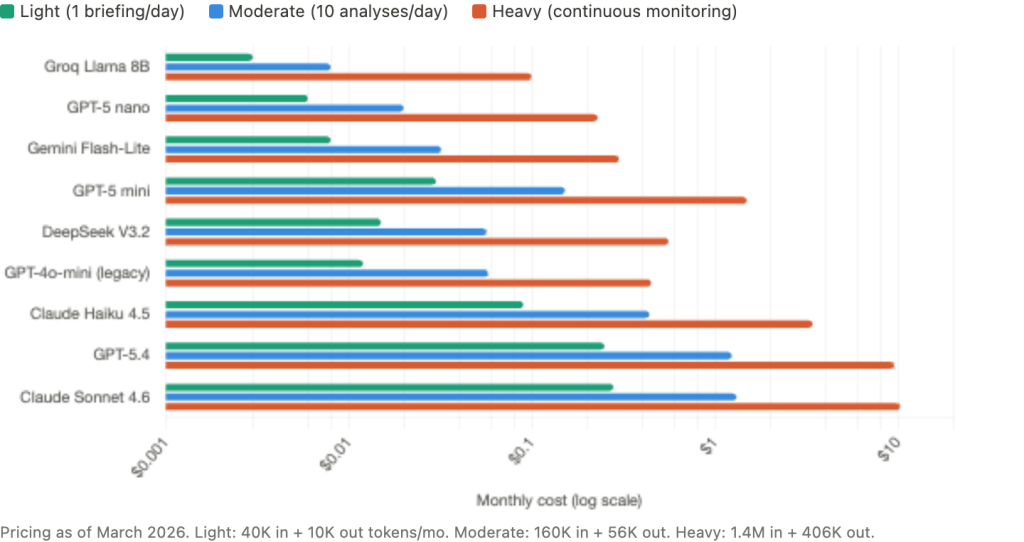
As of March 2026, the pricing landscape across major providers spans roughly two orders of magnitude. OpenAI’s GPT-5 nano processes input at $0.05 per million tokens and output at $0.40 per million. GPT-5 mini runs $0.25 input and $2.00 output. The flagship GPT-5.4 costs $2.50 input and $15.00 output. On the Anthropic side, Claude Haiku 4.5 runs $1.00 input and $5.00 output, while Claude Sonnet 4.6 costs $3.00 input and $15.00 output. Budget alternatives include Google’s Gemini 2.5 Flash-Lite at $0.10/$0.40 and Groq’s Llama 3.1 8B at $0.05/$0.08, the cheapest option available. DeepSeek V3.2 at $0.28/$0.42 offers strong quality at low cost. Note that GPT-4o and GPT-4o-mini are now legacy models, and GPT-3.5 Turbo was removed entirely in April 2025.
What do these numbers mean for actual trading workflows? A daily pre-session briefing generates roughly 2,000 input tokens and 500 output tokens. Over 20 trading days per month, that totals 40,000 input and 10,000 output tokens. Monthly cost: $0.003 with GPT-5 nano, $0.03 with GPT-5 mini, $0.09 with Claude Haiku. Functionally free at every model tier.
Adding 10 trade analyses per day and 5 economic event interpretations per week brings the monthly total to approximately 160,000 input and 56,000 output tokens. Monthly cost: $0.01 to $1.32 depending on model. Under $1.50 even with the most expensive option.
Heavy continuous monitoring, including everything above plus sentiment analysis on 75 news items per day and 50 additional queries per day, generates roughly 1.4 million input and 406,000 output tokens per month. Monthly cost: $0.10 with Groq to $10.32 with Claude Sonnet. Even the most expensive model at the heaviest realistic usage level costs about $10 per month.
The comparison that matters for VPS planning: upgrading from a 4 GB VPS to an 8 GB VPS to accommodate local NLP models costs $10 to $25 per month. The API fees for equivalent or superior analysis quality cost $0.01 to $10 per month. The barrier to adding AI to a trading VPS is not the API bill. It is understanding which VPS tier supports your workload, how to connect Python to MetaTrader reliably, and how to schedule analysis so it does not interfere with execution. Those are infrastructure problems, and the preceding sections address each one.
FAQ
Can I run AI tools on the MetaQuotes built-in VPS?
The MetaQuotes VPS ($12.80 to $15 per month) runs a lightweight MetaTrader terminal without a full Windows desktop. It does not support Python, Flask servers, NSSM services, or any process outside of MetaTrader itself. The only AI option is WebRequest() calls directly from an EA to an external API. This works for simple use cases like a periodic GPT analysis call, but you cannot run a local Python server, install spaCy or any NLP library, or use file-based communication with external scripts. The service also has no DLL support, which rules out ZeroMQ bridges. For AI workloads beyond basic WebRequest() API calls, a full Windows VPS is required.
Does sending trading data to OpenAI or Claude violate GDPR?
This is a compliance question without a definitive legal answer as of March 2026. When a trader on an EU-based VPS sends account data, position details, or market analysis to a US-based API endpoint, that data crosses jurisdictional boundaries. OpenAI and Anthropic both process data on US infrastructure. For individual retail traders, the practical risk is low because the data typically does not contain personally identifiable information beyond what the trader themselves inputs. For professional fund managers, prop firm operators, or anyone handling client data, the question is more consequential and should be reviewed with a compliance advisor. The infrastructure-level mitigation is to avoid sending account identifiers, client names, or personally identifying details in API prompts.
Can I backtest an EA that uses AI API calls?
No. WebRequest() is disabled in MT5’s Strategy Tester, and this is by design rather than a bug. Any EA whose trading logic depends on an external API response cannot be backtested. The workaround some developers use is to pre-generate AI signals for historical periods, store them in a CSV file keyed by date and time, and have the EA read from the file during backtesting instead of calling the API. This tests the EA’s trade management logic with historically plausible AI signals, but it does not test the AI’s actual predictive performance because the signals were generated after the fact with knowledge of subsequent price action. Treat any vendor claiming backtested results for a WebRequest-dependent EA with skepticism.
What happens to my AI analysis if the API provider has an outage during trading?
Your EA receives a WebRequest() timeout error or HTTP error code instead of an analysis response. A well-coded EA handles this gracefully by falling back to its non-AI trading logic, skipping the analysis cycle, and retrying on the next scheduled interval. A poorly coded EA may freeze, crash, or make decisions based on stale cached data without indicating that the data is stale. When building or evaluating AI-integrated EAs, test the failure path explicitly: disconnect from the internet and verify that the EA behaves safely. The Flask/FastAPI local server pattern adds a second layer of resilience because the EA always reaches the local server (which responds in under 50ms), and the server itself handles API failures, retries, and fallback logic independently.
Should I use GPT or Claude for forex analysis?
Both produce comparable quality for the types of analysis retail traders typically request: pre-session briefings, economic event interpretation, sentiment classification, and trade journal review. The practical differences are pricing and rate limits rather than analytical quality. GPT-5 nano is the cheapest option at $0.05 per million input tokens. Claude Haiku 4.5 offers strong analytical quality at $1.00 per million input tokens. For traders processing fewer than 100 queries per day, the monthly cost difference between any two models is under $10. Choose based on which provider’s API documentation you find easier to integrate, not on analytical superiority claims that neither provider has substantiated for forex-specific use cases.
References
- MetaQuotes Software Corp. MQL5 Reference: WebRequest() function. Synchronous/blocking execution, halts EA thread until response or timeout. URL whitelist required in Tools, then Options, then Expert Advisors. Cannot be called from indicators. Disabled in Strategy Tester, making backtesting of API-dependent EAs impossible. Accessed March 2026.
- MetaQuotes Software Corp. MetaEditor AI Assistant. Built into MT5 since Build 3800 (June 2023). OpenAI-powered coding assistant within MetaEditor IDE. Models available: GPT-3.5 Turbo, GPT-4 Turbo, GPT-4o. Development tool only, not runtime trading analysis.
- MQL5 Blog. “ChatGPT Integration Claims in Expert Advisors.” February 2024. Documents vendors misrepresenting backtested results: “Many vendors mistakenly claim to have integrated ChatGPT into their Expert Advisors, backing these claims with impressive backtests… the WebRequest() function is not available during backtesting.”
- ARIA Connector EA. MQL5 Market, MT5. OpenAI API integration with configurable query frequency from 1 to 240 minutes. Returns BUY/SELL/WAIT suggestions with confidence levels. Estimated API cost: $0.001 to $0.005 per analysis.
- ClearAI EA. MQL5 Market, MT5. Claude (Anthropic) API integration with sentiment analysis from five sources, live chat interface inside MT5. Requires Anthropic API key and continuous terminal operation.
- AI Trading Connection Expert MT5. MQL5 Market, free. Connects to ChatGPT and Claude APIs. Explicitly stated: “This Expert Advisor is strictly analytical and does not perform trade executions.”
- “Price Action Analysis Toolkit (Part 36).” MQL5 Articles. Complete production architecture: Python Flask server with scikit-learn model, EA polling every 60 seconds via WebRequest() to localhost, JSON signals with BUY/SELL/WAIT, confidence scores, and SL/TP levels. Localhost response time: under 50ms.
- “Building AI-Powered Trading Systems in MQL5.” MQL5 Articles, Parts 1 to 2, September 2025. Step-by-step ChatGPT integration with community-built JSON parser and dashboard UI.
- MQL5 Forum. Multiple threads documenting WebRequest() header truncation bug. OpenAI “sk-proj-…” API keys (130 to 160 characters) silently dropped, causing persistent 401 authentication errors. No official fix documented as of March 2026.
- MQL5 Forum. MetaEditor Copilot thread (95+ pages). Community consensus: helpful for boilerplate and ideas but produces frequent errors in MQL-specific syntax.
- ProsusAI. FinBERT. Hugging Face model repository. Pre-trained BERT fine-tuned on financial text. CPU inference requires approximately 2 to 4 GB RAM. Community-reported figure, not formally benchmarked.
- ScienceDirect. Research comparing LLM and FinBERT performance on forex headline sentiment classification. ChatGPT outperformed FinBERT by 35%. FinBERT agreed with GPT-4-level models 69% of the time.
- FinVADER. GitHub repository. Enhanced VADER with two financial lexicons (~7,300 terms). 339x faster than FinBERT, approximately 56% accuracy on financial text. RAM: under 100 MB.
- Willison, S. Personal blog. Documented llama.cpp CPU-only inference: 748% CPU usage on an 8-core system running a 13B parameter model. 7B models exhibit similar all-core saturation. Generation speed on CPU: 1 to 5 tokens per second.
- BizTech Magazine, August 2025. Documented LLM hallucination cases in financial contexts, including fabricated earnings reports for non-existent companies.
- Acuity Trading. ForexBrokers.com 2026 Best Sentiment Analysis Provider. NLP across millions of news articles. Products include NewsIQ, AnalysisIQ, and EventIQ. MT4/MT5 plugin available. Sold B2B to brokers (Tickmill, TMGM); retail traders access free through participating brokers.
- FXSSI (Forex Sentiment Board). Retail positioning indicators for MT4/MT5: Current Ratio, Order Book, Stop Loss Clusters. Pricing: $15 to $50 per indicator.
- Truffle Security, February 2025. Research finding approximately 12,000 live API keys embedded in LLM training datasets. Demonstrates real-world risk of API key exposure.
- ForexFactory Forum, thread 1353021. Documented case of trader posting complete OpenAI API key in MT4 error logs shared publicly. Illustrates the most common API key exposure vector for MetaTrader users.
- Auth0 Documentation. LLMjacking attack pattern: stolen API keys used for unauthorized inference. Documented case of individual bill spiking from $2/month to over $10,000 in half a day.
- HostStage, FXVPS, MyForexVPS. MetaTrader process priority recommendation: set to High for trading terminals running alongside AI workloads. Commercially interested sources selling VPS hosting. Directionally consistent with independent community practice.
- OpenAI, Anthropic, Google, Groq, DeepSeek. API pricing as of March 2026. GPT-5 nano ($0.05/$0.40 per million tokens), GPT-5 mini ($0.25/$2.00), GPT-5.4 ($2.50/$15.00), Claude Haiku 4.5 ($1.00/$5.00), Claude Sonnet 4.6 ($3.00/$15.00), Gemini 2.5 Flash-Lite ($0.10/$0.40), Groq Llama 3.1 8B ($0.05/$0.08), DeepSeek V3.2 ($0.28/$0.42). Pricing changes frequently; verify on provider websites before budgeting.
Editorial Note
This article covers the infrastructure requirements for running AI-assisted trading tools alongside MetaTrader on a VPS. It does not constitute financial advice, trading strategy guidance, or a recommendation of any specific AI tool, LLM provider, or trading approach. No AI tool can reliably predict market direction, and this article makes no claims about the profitability of AI-assisted trading strategies.
API pricing throughout this article reflects published rates as of March 2026 and changes frequently. Verify current pricing on each provider’s website before budgeting. RAM consumption figures are reference ranges drawn from verified benchmarks, community reports, and component profiling. Actual consumption varies by Python library versions, model sizes, operating system configuration, and MetaTrader chart and indicator load.
VPS provider recommendations cited in this guide (HostStage, FXVPS, MyForexVPS) are commercially interested sources selling VPS hosting services. Their process priority and resource planning guidance is directionally consistent with independent community practice but should not be treated as independent verification.
This article covers AI tools that assist a human trader in making decisions. A separate article in this series covers fully autonomous LLM-based trading agents, which have a different infrastructure profile, different risk characteristics, and different regulatory considerations. The distinction matters: a copilot that provides analysis for human review is a fundamentally different workload from an agent that executes trades independently.