An LSTM model running inference on a 2 vCPU VPS takes under 10 milliseconds per prediction. An XGBoost classifier with 32 engineered features completes in under 1 millisecond. The hardware requirements for running AI trading bots are not what most traders expect. A $5 to $15 per month VPS handles single-model inference alongside MetaTrader 5 when the model is deployed correctly. The gap between traditional Expert Advisors and AI-powered bots is real, but it is a configuration problem, not a compute problem.
The single most impactful optimization is converting trained models to ONNX format before deployment. ONNX Runtime consumes 30 to 100 MB of RAM. Full TensorFlow consumes 1.7 to 4.8 GB. That difference determines whether the bot fits on budget VPS hardware or requires a dedicated server. GPU acceleration is unnecessary for virtually all retail trading bot workloads. CPU inference latency is already below the interval between candle closes on any timeframe a retail trader monitors.
The infrastructure challenges that actually cause bot failures in production are less glamorous: maintaining persistent broker API connections through network interruptions, ensuring process supervision survives Windows updates and crashes, and navigating the Windows-only constraint that MetaTrader 5’s Python integration imposes on deployment architecture.
This article covers the server-side infrastructure for running AI trading bots on a VPS. It examines which models retail traders actually deploy, how ONNX Runtime changes the resource equation, how to set up Python and Node.js environments on Windows Server, which broker APIs work from a VPS and their rate limits, and how to keep bots running unattended. The focus is on deployment and operations, not on building or training models.
Sources include MetaQuotes documentation, PyPI package specifications, MQL5 Forum developer measurements, broker API documentation (OANDA, Interactive Brokers, cTrader, IG Markets), academic research, and VPS provider benchmarks. Commercially motivated sources are flagged where cited.
What “AI Trading Bots” Actually Mean for Server Hardware
The term “AI trading bot” covers a wide range of models with infrastructure requirements that differ by an order of magnitude. A scikit-learn Random Forest classifier consuming 30 MB of RAM and a full PyTorch transformer pipeline consuming 3 GB are both marketed as “AI trading bots.” The VPS they need is not the same VPS.
The models retail traders actually deploy fall into a clear hierarchy. LSTM networks dominate deep learning approaches for forex price prediction. XGBoost and gradient boosting methods lead classification-based signal generation, with one comparative study reporting XGBoost achieving approximately 67.2 percent mean accuracy with 32 or more engineered features. Random Forests serve as common baselines. GRU networks appear as lighter LSTM alternatives, with some studies reporting GRU outperforming LSTM on certain datasets. LightGBM and CatBoost are gaining traction as XGBoost variants with smaller footprints. Less common but growing: reinforcement learning (DQN, PPO) for dynamic strategy optimization, CNN models for chart pattern recognition sometimes combined with LSTM in hybrid architectures, and transformer-based models that remain mostly institutional and experimental at retail scale. A 2024 ScienceDirect study tested Ridge regression, KNN, Random Forest, XGBoost, GBDT, ANN, LSTM, and GRU across six major forex pairs from 2000 to 2023. No single model type dominates. Performance varies significantly across datasets, and ensemble approaches that stack multiple models represent a growing trend.
The frameworks these models run on determine the VPS footprint far more than the models themselves. scikit-learn is lightweight at 30 to 40 MB installed. XGBoost adds 100 to 150 MB including CPU binaries. LightGBM is the most compact gradient boosting option at 5 to 10 MB. TensorFlow for CPU-only inference consumes approximately 600 MB installed, down from over 1 GB for GPU-enabled builds. PyTorch CPU-only installs at 200 to 300 MB, dramatically smaller than the 1 GB or more CUDA-enabled version. These are installed sizes. Runtime memory consumption is a separate and often larger concern, covered in Section 4.
The fundamental architectural difference between AI bots and traditional Expert Advisors is that AI bots require a separate runtime. A compiled .ex5 Expert Advisor runs inside the MT5 terminal process, consuming 300 to 500 MB RAM with low CPU usage. An AI bot adds either a Python process communicating with the terminal via inter-process communication, or a standalone process connecting to broker APIs over the network. This adds 200 MB to 3 GB of additional RAM depending on framework choice, requires a full Windows desktop environment rather than the lightweight MetaQuotes built-in VPS, and introduces IPC or network latency that does not exist for native EAs.
The MetaTrader5 pip package communicates with the terminal via IPC. Both the Python process and the MT5 terminal must run on the same Windows machine. Measured roundtrip latency for this IPC channel is approximately 573 milliseconds from Python through the bridge to the terminal, plus roughly 97 milliseconds from the terminal to the broker server. For candle-based strategies where inference runs once per bar close, this latency is negligible. For tick-level strategies, it is a meaningful bottleneck.
No authoritative survey exists on exact language usage percentages among retail algo traders. MQL4/MQL5 dominates the forex retail space due to MetaTrader’s 80 percent or greater broker adoption rate. Python is the primary language for ML model development even when the deployment target is MT5. The inferred ranking for retail forex: MQL4/MQL5 first, Python second, C# (NinjaTrader and cTrader Automate) third.
MetaTrader 5’s Python and ONNX Integration
MetaTrader 5 provides two distinct paths for running AI models: an external Python process communicating with the terminal via IPC, and native ONNX inference running inside the terminal process itself. The two paths serve different use cases and have fundamentally different infrastructure profiles.
The MetaTrader5 pip package (current version 5.0.5735, published by MetaQuotes) connects a Python script to a running MT5 terminal via inter-process communication. It supports Python 3.6 through 3.14, but every published wheel file targets win_amd64 exclusively. There is no Linux build. There is no macOS build. The Python process and the MT5 terminal must run on the same Windows machine. This is not a network API. It is local IPC, and it imposes the Windows-only constraint that shapes every deployment decision in this article.
The package enables market data retrieval via copy_rates_from() and copy_ticks_from(), account and position queries, trade execution via order_send(), and symbol information lookups. The mt5.initialize() function establishes the IPC channel and can accept login credentials to specify a broker account. For multiple broker accounts, each requires a separate MT5 terminal installation in a different directory. Only one terminal connection per Python process is supported. Switching accounts means calling mt5.shutdown() and reinitializing, which adds several seconds of overhead per switch.
The measured IPC roundtrip latency is approximately 573 milliseconds from Python through the bridge to the terminal, plus roughly 97 milliseconds from the terminal to the broker server. For a bot running inference on each H1 candle close, this 670 millisecond total is irrelevant. For a bot attempting per-tick execution, it is a hard constraint that no VPS upgrade can reduce because the bottleneck is the IPC bridge, not the network or CPU.
The native ONNX path eliminates the Python dependency entirely. ONNX support in MetaTrader 5 has evolved through several major builds since its introduction in March 2023. Build 3620 added the core functions: OnnxCreate(), OnnxRun(), OnnxRelease(), and the shape-setting functions for input and output tensors. Build 3930 in late 2023 added AVX2 support, improving inference performance on modern CPUs. Build 4210 in February 2024 brought Float16 and Float8 data types and updated the bundled ONNX Runtime to version 1.17. Build 5572 in January 2026 added CUDA GPU support, lazy-loading of the ONNX library to reduce startup overhead, a raised resource file limit of 1 GB, multi-GPU device selection, and profiling support.
Any model exportable to ONNX format runs natively in MQL5: neural networks (LSTM, CNN, MLP, GRU, transformers), tree-based models (Random Forest, XGBoost, LightGBM via onnxmltools), SVMs, and linear models. The inference runs inside the terminal process with no external runtime, no IPC latency, and no Python installation required. For models that can be expressed as ONNX, this is the lightest possible deployment path.
Three limitations constrain the native ONNX approach. Not all ONNX operators are supported, and models using unsupported operators fail to load without a clear error message pointing to the specific operator. A maximum of 256 simultaneous ONNX models can be loaded. And critically, all data preprocessing must be replicated exactly in MQL5. A model trained on z-score normalized features in Python will produce wrong predictions if the MQL5 code normalizes differently. Multiple MQL5 Forum threads document numerical discrepancies between Python and MQL5 ONNX outputs traced to differences in data type handling, particularly around float32 versus float64 precision.
ONNX models embedded as resources in compiled .ex5 files work on MetaQuotes’ built-in VPS. This means a trader can deploy an AI model on the $12.80 to $15 per month MetaQuotes hosting without a full Windows VPS. The constraints are significant: no AVX512-compiled programs, no GPU/CUDA capability, no Python runtime for anything beyond what the ONNX model itself computes, no external file access, no custom DLLs, and approximately 1 to 2 GB of available RAM. For a single ONNX model performing candle-based inference, this is sufficient. For anything requiring Python-side feature engineering, multiple models, or external API calls, a dedicated Windows VPS is necessary.
ONNX Runtime: The Single Biggest Optimization
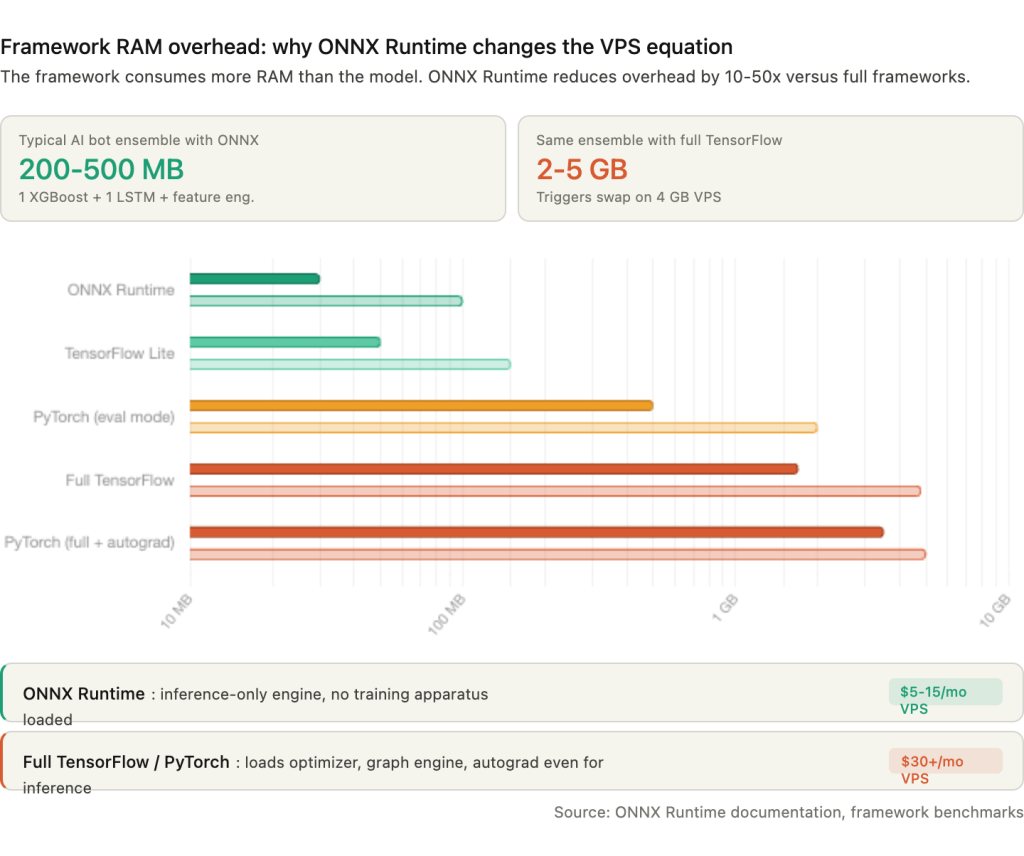
The framework a model runs on consumes more RAM than the model itself. A 50 MB LSTM model running inside full TensorFlow loads 1.7 to 4.8 GB of runtime overhead before it processes a single input. The same model exported to ONNX and loaded by ONNX Runtime consumes 30 to 100 MB total. That is not a marginal improvement. It is the difference between fitting on a $5 per month VPS and requiring a $30 per month server with 8 GB of RAM.
The overhead hierarchy across frameworks is steep. ONNX Runtime sits at the bottom at 30 to 100 MB base overhead, with documented cases of INT8-quantized models like SqueezeNet running under 37 MB peak. TensorFlow Lite, designed specifically for inference on constrained devices, runs 50 to 150 MB. Full TensorFlow loads 1.7 to 4.8 GB regardless of model complexity because the runtime imports the entire computation graph engine, optimizer infrastructure, and training apparatus even when only inference is needed. PyTorch in evaluation mode with autograd disabled consumes 500 MB to 2 GB. PyTorch with full autograd enabled reaches 3.5 to 5 GB.
For a practical AI trading bot ensemble running one XGBoost model for signal classification and one LSTM for price direction, plus pandas-based feature engineering, the total memory footprint is approximately 200 to 500 MB with ONNX Runtime versus 2 to 5 GB with full TensorFlow. On a 4 GB VPS where Windows Server claims roughly 1 GB and an MT5 terminal with one EA takes 300 to 500 MB, the ONNX deployment leaves 2 to 2.5 GB of headroom. The TensorFlow deployment leaves nothing, and the system starts swapping.
Exporting trained models to ONNX is straightforward across every major framework. scikit-learn models use the skl2onnx library with convert_sklearn(). TensorFlow and Keras models use tf2onnx with convert.from_keras(). PyTorch models use the built-in torch.onnx.export() function. LightGBM and XGBoost models convert via the onnxmltools library. Within MQL5, the exported model loads via OnnxCreate() from an external file or OnnxCreateFromBuffer() from a resource embedded in the compiled .ex5 binary. Input and output tensor shapes are set explicitly with OnnxSetInputShape() and OnnxSetOutputShape() before calling OnnxRun() for inference.
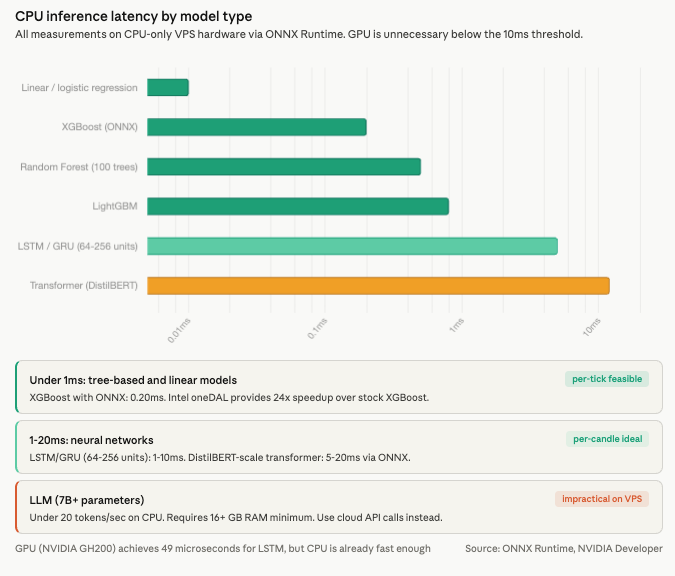
CPU inference latency with ONNX Runtime is already below any meaningful trading threshold. Linear and logistic regression models complete in under 0.01 milliseconds. Random Forest with 100 trees runs 0.1 to 1 millisecond. XGBoost and LightGBM complete in under 1 millisecond, with ONNX-optimized XGBoost measured at 0.20 milliseconds. Intel’s oneDAL acceleration provides a documented 24x speedup over stock XGBoost inference. LSTM and GRU networks with 64 to 256 units complete in 1 to 10 milliseconds. Transformer models at DistilBERT scale run 5 to 20 milliseconds through ONNX, making per-candle sentiment analysis feasible on VPS hardware.
GPU acceleration delivers dramatic speedups in absolute terms. NVIDIA benchmarks show LSTM inference at 49 microseconds on a GH200 versus 5 to 50 milliseconds on CPU, a 100x or greater improvement. But the absolute CPU latency is already under 10 milliseconds for the models retail traders run. A candle-based strategy executing inference once per minute, or once per hour, does not benefit from reducing 5 milliseconds to 49 microseconds. GPU becomes relevant only for per-tick neural network inference or local LLM integration, neither of which is standard practice for retail forex. For LLM-based analysis such as news sentiment, API calls to cloud services (OpenAI, Anthropic) are more practical than running 7 billion or more parameter models locally, which would require 16 GB or more of RAM and produce fewer than 6 to 20 tokens per second on CPU.
Python Environment Setup on a Windows VPS
The Python installation on a trading VPS differs from a development workstation in one important way: it needs to run unattended for months. Choices that seem trivial during setup, such as which installer to use, where to install, and how to manage virtual environments, determine whether the bot survives a VPS reboot, a Windows update, or an RDP session disconnect.
The official Python installer from python.org is recommended over alternatives. Silent installation via PowerShell works for automated provisioning: python-3.12.x-amd64.exe /quiet InstallAllUsers=1 PrependPath=1 Include_test=0. The “Install for all users” flag is critical. Without it, Python installs under the current user’s profile path, which breaks when a Windows service or NSSM-managed process runs under a different account. The Microsoft Store version sandboxes Python in ways that interfere with IPC to MetaTrader and should be avoided on servers. Anaconda adds 400 MB or more of disk overhead and is only justified when TA-Lib installation is needed, since conda handles the underlying C library automatically via conda install -c conda-forge ta-lib.
Python 3.12 is the recommended version as of early 2026. TensorFlow 2.21 provides win_amd64 wheels for 3.12. PyTorch 2.11 supports 3.10 through 3.13. The MetaTrader5 pip package lists support for 3.6 through 3.14. One caveat worth noting: TensorFlow 2.10 was the last version with native GPU support on Windows. From TensorFlow 2.11 onward, Windows builds are CPU-only, maintained by Intel as tensorflow-intel. This is largely irrelevant for VPS deployments since GPU is unnecessary for retail inference workloads, but traders migrating existing GPU-trained workflows to a VPS should be aware of the change.
For virtual environments, venv is the production choice. It creates lightweight isolated environments at roughly 20 MB each and works cleanly with NSSM service configuration. Conda environments are heavier and add complexity to service management but solve one specific pain point: TA-Lib installation. The Python TA-Lib wrapper requires the underlying C library, and building it from source on Windows demands Visual Studio Build Tools with the “Desktop development with C++” workload and the x64 Native Tools Command Prompt. Since version 0.6.5, pre-built binary wheels are available on PyPI via GitHub Actions, and the cgohlke/talib-build repository provides version-matched wheels. Pure Python alternatives like pandas_ta and ta require no C library at all and serve as simpler substitutes when the full TA-Lib function set is not needed.
Running a Python trading bot as a proper Windows service requires NSSM (Non-Sucking Service Manager). It is a single portable executable of roughly 300 KB requiring no installation. The configuration is direct: point NSSM at the Python executable inside the virtual environment, specify the bot script as the argument, set stdout and stderr log paths, and inject environment variables for API keys. NSSM defaults to Automatic startup (starts on boot without user login), auto-restarts on crash, and supports log file redirection. The GUI mode provides a visual configuration interface for traders who prefer not to work from the command line.
One critical caveat applies to any bot that communicates with MetaTrader 5 via the Python IPC bridge. The MT5 terminal is a GUI application that requires an active Windows desktop session. If the user logs off, the terminal closes and the Python bot loses its IPC connection. Three solutions address this. Sysinternals Autologon configures automatic login after reboot so the desktop session is always present. The tscon command disconnects an RDP session without logging off, keeping the desktop alive for the terminal. And placing the MT5 shortcut in the Windows Startup folder with the /portable flag ensures the terminal relaunches automatically after any restart.
Broker API Connectivity from a VPS
An AI trading bot needs two things from a broker connection: a data feed for model input and an execution channel for trade output. The available APIs differ in protocol, rate limits, platform dependency, and whether they require a GUI application running alongside the bot. These differences determine VPS architecture more than the model itself.
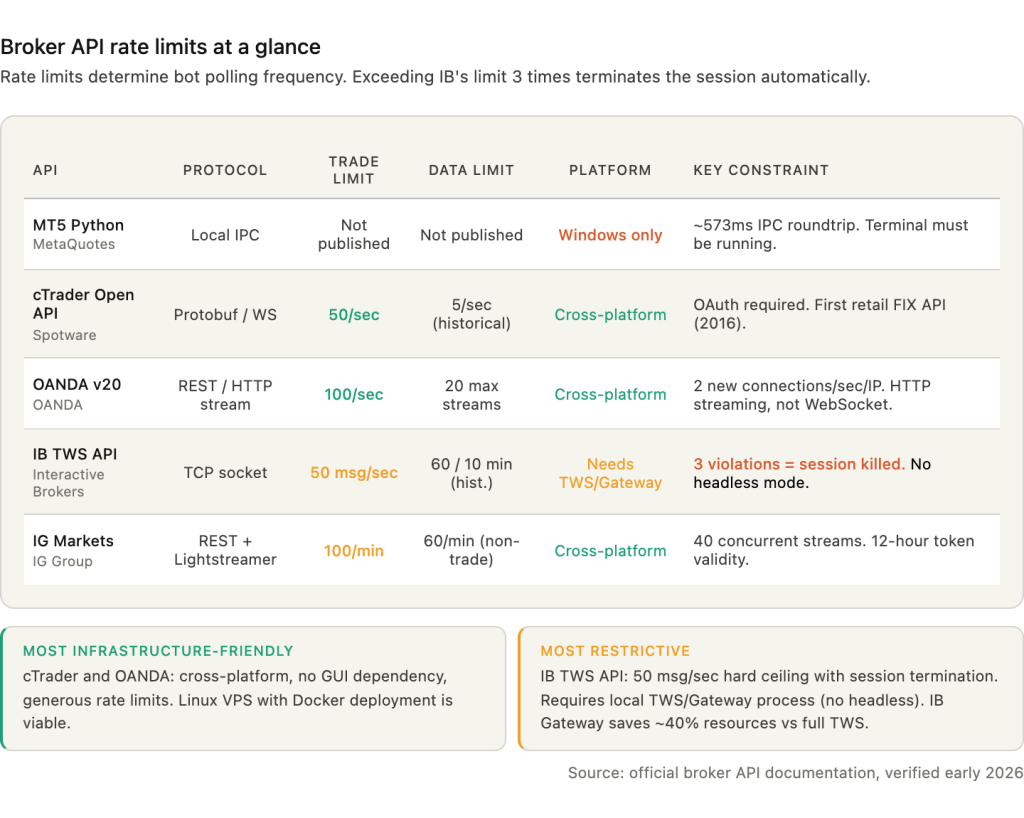
The MetaTrader 5 Python API handles both data and execution through local IPC to a running MT5 terminal. The terminal manages all broker connectivity via MetaQuotes’ proprietary protocol. The bot calls copy_rates_from() for historical data, copy_ticks_from() for tick data, and order_send() for execution. The advantage is simplicity: no API keys, no token refresh, no WebSocket management. The constraint is total: the MT5 terminal must be running on the same Windows machine, consuming 300 to 500 MB of RAM and requiring an active desktop session. No formal rate limits are published, but the IPC mechanism’s ~573 millisecond roundtrip acts as a natural bottleneck. For multi-broker setups, each broker account requires its own terminal installation.
The cTrader Open API uses Google Protocol Buffers over TCP with SSL, or WebSocket for lighter integrations. It is cross-platform, meaning a Python bot on a Linux VPS can connect without a GUI application. Registration with Spotware and OAuth authentication are required. Rate limits are generous for live data at 50 requests per second for non-historical queries, but historical data is throttled to 5 requests per second. cTrader was the first retail platform to offer FIX API access in 2016 with no minimum deposit requirement, making it the most infrastructure-friendly option for traders who want direct protocol-level connectivity.
OANDA’s v20 REST API uses token-based authentication with separate endpoints for live and demo accounts. Rate limits allow 100 requests per second on persistent connections, with a cap of 2 new connections per second per IP and a maximum of 20 active streams. A notable architectural choice: OANDA uses HTTP streaming via chunked transfer encoding for real-time pricing rather than WebSocket. The efficient polling pattern uses TransactionID-based incremental account updates, avoiding the need to re-query full account state on every cycle.
Interactive Brokers’ TWS API communicates via TCP socket to either TWS (the full trading workstation) or IB Gateway, which runs locally. IB Gateway uses approximately 40 percent fewer resources than TWS because it has no GUI, making it the preferred choice for VPS deployments. The API supports up to 32 simultaneous client connections. The hard rate limit of 50 messages per second is strictly enforced: exceeding it three times terminates the session automatically. Historical data has its own pacing rules: no identical requests within 15 seconds, maximum 60 historical requests per 10 minutes. Neither TWS nor Gateway supports headless operation. Community workarounds like IBC Docker images automate the login process but require disabling two-factor authentication, which creates a security tradeoff.
IG Markets provides a REST API for trading alongside the Lightstreamer protocol for real-time streaming. Rate limits are tighter than other brokers: 100 trading requests per minute and 60 non-trading requests per minute on live accounts, with demo accounts receiving lower limits. A maximum of 40 concurrent streaming subscriptions constrains multi-pair monitoring. Authentication tokens (CST and X-SECURITY-TOKEN headers) remain valid for 12 hours between API calls, which is convenient for bots that trade infrequently but means the bot must handle token refresh for longer sessions.
FIX protocol operates over persistent TCP connections using FIX 4.4, the most widely deployed version. Historically institutional-only, FIX is now accessible to retail traders through cTrader and some brokers. It requires a FIX engine (QuickFIX is the standard open-source implementation) and has a specific scope limitation: standard FIX cannot query account details like equity or balance, and it cannot access historical data. It provides real-time execution and market data only. For AI bots that need historical data for feature engineering, FIX must be paired with a REST API or separate data source.
The Node.js ecosystem serves primarily crypto and multi-exchange bots. CCXT supports 107 or more cryptocurrency exchanges via REST and WebSocket. The technicalindicators library provides 30 or more indicators in pure JavaScript. PM2 is the standard Node.js process manager, but it has no built-in Windows startup support. The recommended workaround is pm2-installer, which creates a proper Windows service. For forex-specific AI bots, Python dominates. Node.js is the practical choice only when the target exchanges are primarily cryptocurrency platforms or when the development team’s expertise is JavaScript-first.
Persistent Connections and Reconnection Handling
A trading bot that connects to a broker API at startup and assumes the connection will hold indefinitely will fail within days. Network interruptions, broker server maintenance, VPS provider routing changes, and Windows TCP stack behavior all cause disconnections that the bot must handle without manual intervention.
The default Windows TCP keep-alive timeout is 2 hours. The registry value KeepAliveTime under HKEY_LOCAL_MACHINE\SYSTEM\CurrentControlSet\Services\Tcpip\Parameters is set to 7,200,000 milliseconds. For a trading connection, two hours of silence before detecting a dead socket means two hours of missed data and unmanaged positions. Reduce this to 300,000 milliseconds (5 minutes) or lower. Windows sends 10 keep-alive probes before dropping a connection once the timeout triggers. Some reports suggest KeepAliveTime may be ignored on Windows Server 2019, which is why application-level heartbeats should always be the primary mechanism rather than relying on the TCP stack alone.
The standard reconnection pattern uses exponential backoff with jitter. The delay between retry attempts follows the formula: delay equals the minimum of (base multiplied by 2 raised to the attempt number, plus jitter) and maximum delay. A base delay of 500 milliseconds, maximum delay of 30 seconds, and random jitter of 0 to 1,000 milliseconds prevents the thundering herd problem where multiple bots or sessions reconnect simultaneously and overwhelm the broker’s connection handler. Allow 10 to 15 maximum retry attempts before escalating to an alert system. Reset the attempt counter on successful connection. After exhausting retries, the bot should surface the error to Telegram or push notification for manual intervention rather than continuing to retry indefinitely against a potentially down server.
What happens to open positions during a disconnection is the most important question traders ask about connection failures, and the answer is reassuring for the right reasons. Positions remain on the broker’s server. They are not automatically closed when the client disconnects. Server-side stop-loss and take-profit orders continue to execute regardless of client connection status. Pending orders remain active. The risk is specifically in what stops working: client-side trailing stops stop updating, position sizing logic halts, and any conditional exit logic that depends on the bot’s evaluation (partial closes, time-based exits, correlation-based hedging adjustments) ceases entirely.
The mitigation is architectural. Always set server-side stop-loss orders on every position as a catastrophic-loss prevention layer, even when the bot manages tighter exits through its own logic. Implement reconnection handling with the exponential backoff pattern described above. Use broker-provided trailing stop features (where available) rather than client-calculated trailing stops that freeze on disconnect. And treat the reconnection event as a state reconciliation point: on reconnection, the bot should query all open positions and pending orders, compare them against its internal state, and resolve any discrepancies before resuming normal operation.
VPS location affects connection quality more than bandwidth. Co-located VPS hardware achieves 0.3 to 5 milliseconds of latency to brokers in the same data center. Home internet connections add 80 to 300 milliseconds. The major forex broker data center locations remain Equinix LD4 in London (largest concentration of forex brokers including IC Markets and Pepperstone), Equinix NY4 in New York, Equinix TY3 in Tokyo, and Equinix SG1 in Singapore. Forex price streaming is lightweight at under 1 Mbps even for dozens of pairs. Network quality, measured as stable latency with low jitter, matters far more than raw bandwidth for persistent API connections.
VPS Sizing: Concrete Recommendations
The sizing question for AI trading bots reduces to three variables: which framework runs the model, how many models run simultaneously, and whether the bot depends on MetaTrader 5 or connects to broker APIs directly. The framework choice alone can shift the RAM requirement by 4 GB, which is why Section 4 covered ONNX Runtime before this section covers VPS plans.
A single MT5 terminal with 1 to 2 EAs consumes 100 to 200 MB RAM and 5 to 15 percent of a single vCPU. Heavy usage with 5 or more EAs and multiple charts scales to 500 MB to 1.5 GB RAM and 25 to 50 percent of 2 or more vCPU cores. Community benchmarks consistently report 7 to 15 percent average CPU for typical EA operation. These figures form the baseline that the AI component adds to.
Tier 1 covers a simple bot with ML signal filtering: an MQL5 EA running on MT5 with a Python co-process performing XGBoost or LightGBM inference via ONNX Runtime. This needs 2 vCPU, 4 GB RAM, and 50 GB NVMe storage. The RAM budget breaks down to roughly 1 GB for Windows Server, 300 to 500 MB for the MT5 terminal, 200 to 500 MB for the Python process with ONNX Runtime, and 1.5 to 2 GB of headroom for peaks and OS caching. Estimated cost: $5 to $15 per month.
Tier 2 covers a multi-model ensemble with real-time feature engineering: multiple ML models running inference through ONNX Runtime, pandas-based feature pipelines processing tick or candle data, and potentially a separate monitoring process. This needs 4 vCPU, 8 GB RAM, and 100 GB NVMe. Either Windows Server for MT5-based setups or Linux for REST API-only bots. Estimated cost: $15 to $30 per month.
Tier 3 covers multiple bots across multiple brokers: 3 or more MT5 terminal installations, AI inference pipelines per broker, and a monitoring stack with health endpoints and Telegram alerting. This needs 8 vCPU, 16 to 32 GB RAM, and 200 GB NVMe. Dedicated CPU cores (not shared) are recommended at this tier to avoid noisy-neighbor contention during high-volatility periods when all bots increase processing simultaneously. Estimated cost: $25 to $60 per month.
Storage requirements accumulate from several sources that are easy to underestimate. Model files range from 1 to 50 MB for XGBoost to 25 to 200 MB for large Random Forests to 1 to 250 MB for neural networks. Historical data for feature engineering runs 100 MB to 5 GB depending on timeframe granularity and symbol count. Logs accumulate 10 to 100 MB per month. The operating system plus trading platform requires 15 to 30 GB on Windows or 5 to 10 GB on Linux. A Python environment with ML dependencies adds 2 to 5 GB. Total recommended minimum: 50 to 100 GB NVMe.
Inference frequency is the key CPU multiplier that determines whether a Tier 1 VPS suffices or Tier 2 is necessary. Per-hour or per-candle inference on intervals from 1 minute to 15 minutes registers as negligible CPU load. A 2 vCPU machine handles multiple models easily at this frequency. Per-tick inference with neural networks pushes CPU utilization to 20 to 80 percent and demands 4 or more vCPU cores. The practical boundary: if the bot runs inference only on completed candles, Tier 1 handles it. If it runs inference on every incoming tick, size for Tier 2 minimum.
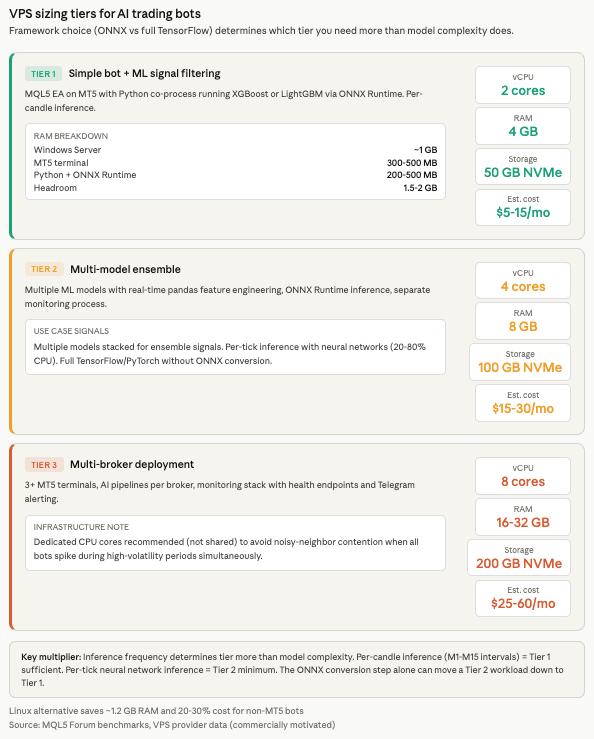
Linux VPS is a genuine alternative for bots that connect to broker REST or WebSocket APIs without any MetaTrader dependency. The resource savings are significant. Windows Server idles at approximately 1.8 GB RAM with the GUI loaded. Ubuntu Server headless idles at roughly 600 MB, freeing approximately 1.2 GB for the bot. Linux VPS plans cost 20 to 30 percent less than Windows equivalents due to eliminated licensing fees, translating to roughly $96 to $120 per year in savings on a typical 4 GB plan. Docker containers provide the cleanest deployment model on Linux, with Freqtrade (the most popular open-source crypto trading bot) explicitly recommending Linux VPS over Windows Docker for production. A 4 GB Linux VPS handles 2 to 3 containerized bot instances comfortably at 1 to 2 GB RAM each. Process supervision via systemd with Restart=on-failure and WatchdogSec=30 provides equivalent or arguably superior reliability to NSSM on Windows.
Monitoring, Auto-Restart, and Failure Recovery
A trading bot that crashes at 3 AM and restarts automatically at 3:01 AM loses one minute of market exposure. A bot that crashes at 3 AM and waits for the trader to wake up and RDP in loses hours. The difference is process supervision, and it is the single most common gap between bots that work in testing and bots that survive production.
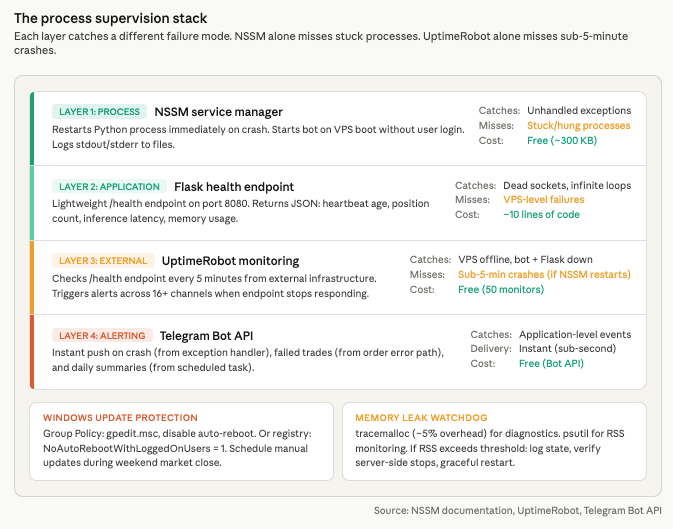
The supervision stack layers multiple safeguards, each catching a different failure mode. NSSM provides first-line process supervision. It restarts the Python process immediately on crash, starts the bot on VPS boot without requiring user login, and logs stdout and stderr to files for post-mortem analysis. This handles the most common failure: an unhandled exception that kills the Python process. NSSM cannot detect a bot that is running but stuck, such as a process consuming CPU in an infinite loop or waiting indefinitely on a dead socket. For that, the bot needs a health endpoint.
A lightweight Flask server running on port 8080 alongside the trading logic exposes a /health endpoint returning JSON with the last heartbeat timestamp, current position count, and recent trade count. This takes roughly 10 lines of code and negligible resources. The endpoint serves two purposes: it gives UptimeRobot something to check, and it gives the trader a quick status view accessible from any browser without opening an RDP session.
UptimeRobot’s free tier monitors the health endpoint at 5-minute intervals. If the endpoint stops responding because the bot crashed, the Flask server died, or the VPS went offline, UptimeRobot triggers alerts through push notification, email, SMS, Telegram, Slack, or any of its 16 or more notification channels. For AI trading bots specifically, the health endpoint should also report model inference latency and memory usage so that gradual degradation is visible before it causes a crash.
Telegram alerts via the Bot API provide instant notification of events that UptimeRobot’s 5-minute polling interval might miss. The bot sends alerts on crashes (from an exception handler that fires before the process dies), failed trades (from the order execution error path), and daily summaries (from a scheduled task). The implementation is a single HTTP POST to api.telegram.org with the bot token and chat ID.
Windows updates cause the most insidious production failures because they reboot the VPS without warning during active trading. The Group Policy method is the most reliable prevention: in gpedit.msc, navigate to Computer Configuration, Administrative Templates, Windows Components, Windows Update, and set “Configure Automatic Updates” to disabled or to “Notify to install and notify to reboot.” Alternatively, the registry key NoAutoRebootWithLoggedOnUsers set to 1 under the WindowsUpdate\AU policy path prevents restarts while a user session is active. Schedule manual updates during the weekend market close.
Memory leaks in long-running Python bots are the second most common production failure after connection loss. Python’s built-in tracemalloc module adds approximately 5 percent overhead with a single frame depth and is the recommended first diagnostic tool. Take hourly snapshots and compare adjacent pairs to identify growing allocations. The psutil library monitors resident set size from outside the process. Common leak sources in trading bots are unbounded DataFrames that grow with each candle or tick, event listener accumulation in WebSocket handlers, unclosed database connections in logging pipelines, and growing caches that are never pruned. The practical safeguard is a memory watchdog: if RSS exceeds a configured threshold, the bot logs its state, closes positions gracefully or ensures server-side stops are set, and restarts itself. Expose a /debug/memory endpoint behind authentication for remote inspection without RDP.
Log rotation prevents a quieter failure. Without rotation, log files grow until the disk is full, at which point the bot crashes with an I/O error. Python’s RotatingFileHandler provides size-based rotation at a configurable maximum (10 MB per file with 5 backup files is a sensible default). TimedRotatingFileHandler rotates at midnight for daily log files. The critical rule for deployment timing: never update bot code during active trading hours. Pull from the Git repository, install any changed dependencies, and restart the service during the weekend market close or outside the bot’s active trading sessions.
Security Hardening for API-Connected Bots
A trading bot on a VPS holds broker credentials, API keys with trade permissions, and in many cases direct access to funded accounts. The security posture of the VPS is not an afterthought. It is the perimeter around live capital.
API key storage is the first vulnerability to address. Hardcoded credentials in source code are compromised within minutes when accidentally committed to a public repository. Automated scanners continuously index GitHub, GitLab, and Bitbucket for patterns matching API keys, and stolen trade-permission keys enable adverse fill attacks even when withdrawal permissions are disabled. The baseline approach uses environment variables loaded via the python-dotenv library from .env files that are added to .gitignore and never committed to version control. For NSSM-managed services, credentials inject per-service via nssm set “TradingBot” AppEnvironmentExtra API_KEY=xxxxx, keeping keys out of the file system entirely. The Windows Credential Manager, accessible through Python’s keyring library, provides OS-level credential storage. For encrypted configuration at rest, the cryptography library’s Fernet symmetric encryption decrypts at runtime using a master key stored in an environment variable, adding a layer of protection if the VPS file system is accessed by an unauthorized party.
IP whitelisting is the single most effective API security measure available. Binance, Bybit, OKX, and Interactive Brokers all support restricting API keys to specific IP addresses. Even if keys are stolen through a compromised development machine or a leaked .env file, they cannot be used from any IP address other than the VPS. A VPS with a static IP makes this practical. Home connections with dynamic IPs make it fragile. Always disable withdrawal permissions on API keys used for trading bots. A compromised key with trade-only permissions can cause losses through bad fills but cannot drain the account directly.
RDP access to the VPS is the most attacked surface. Unsecured RDP is the primary ransomware entry vector, responsible for 70 to 80 percent of network breaches leading to ransomware according to Bleeping Computer. The hardening checklist is short but non-negotiable: change the default port from 3389, enable Network Level Authentication so credentials are validated before a session is created, restrict inbound connections by IP using Windows Firewall scope rules, lock accounts after 5 failed login attempts, use passwords of 15 or more characters, and ideally restrict RDP access to a VPN subnet so that port 3389 (or the custom port) is never exposed to the public internet at all.
Outbound network rules deserve attention for bots that connect to specific broker APIs. Configure Windows Firewall to allow HTTPS (port 443) outbound while blocking unnecessary inbound traffic. Open only the specific inbound ports needed, such as the health check endpoint on port 8080. A bot that connects to OANDA’s REST API, sends Telegram alerts, and exposes a Flask health endpoint needs outbound access to three domains and inbound access to one port. Everything else should be blocked.
FAQ
Do I need a GPU VPS for my AI trading bot?
No, for virtually all retail workloads. CPU inference handles LSTM networks in 1 to 10 milliseconds, XGBoost in under 1 millisecond, and Random Forest in 0.1 to 1 millisecond. GPU acceleration delivers dramatic speedups in absolute terms (NVIDIA benchmarks show 49 microseconds for LSTM on a GH200), but the CPU latency is already far below any trading-relevant threshold. A candle-based strategy running inference once per minute does not benefit from reducing 5 milliseconds to 49 microseconds. GPU becomes relevant only for per-tick neural network inference or running LLM models locally, neither of which is standard for retail forex. For LLM-based sentiment analysis, API calls to cloud services are more practical than local inference, which requires 16 or more GB of RAM and produces fewer than 20 tokens per second on CPU.
Can I run AI bots on MetaQuotes’ built-in VPS?
Only ONNX models embedded as resources in compiled .ex5 files. The ONNX inference runs natively inside the terminal process and works on MetaQuotes VPS at $12.80 to $15 per month. The limitations eliminate most AI bot architectures: no Python runtime, no external file access, no custom DLLs, no GPU/CUDA, no AVX512-compiled programs, and approximately 1 to 2 GB of available RAM. A single ONNX model performing candle-based inference within an MQL5 EA fits. Anything requiring Python-side feature engineering, multiple frameworks, broker API calls, or external monitoring does not.
Should I use Linux or Windows VPS for my trading bot?
Windows if the bot depends on MetaTrader 5 in any way. The MetaTrader5 Python package publishes only win_amd64 wheels. The terminal itself is a Windows application. Running MT5 on Linux via Wine is technically possible using MetaQuotes’ official installation scripts, but Wine 10.3 and later reportedly breaks MT5 (requiring downgrade to 10.2 per MQL5 Forum reports), DLL compatibility failures occur, and performance runs 5 to 10 percent slower than native Windows. Setup takes 2 to 3 hours versus 20 minutes on Windows. For production deployments, it is fragile. Linux is the stronger choice when the bot connects to broker REST or WebSocket APIs (OANDA, Interactive Brokers, crypto exchanges) without any MetaTrader dependency. It saves approximately 1.2 GB of RAM, costs 20 to 30 percent less, and Docker-based deployments with systemd supervision are simpler to maintain than NSSM services on Windows.
What happens to my positions if the bot crashes?
Positions remain on the broker’s server. They are not closed automatically when the client disconnects. Server-side stop-loss and take-profit orders continue to execute regardless of whether the bot is running. Pending orders remain active. What stops working: client-side trailing stops freeze, position sizing logic halts, conditional exit logic ceases, and any feature-engineering-dependent trade management pauses. The architectural safeguard is to always set server-side stop-loss orders on every position as a catastrophic-loss layer, even when the bot manages tighter exits through its own logic. NSSM restarts the process automatically on crash, typically within seconds.
How do I handle the MetaTrader5 Python package’s Windows-only requirement?
Accept it. The package communicates with the MT5 terminal via IPC, and both must run on the same Windows machine. The community-maintained mt5linux package bridges via Wine and RPyC but is not officially supported by MetaQuotes, adds latency, and introduces Wine-related instability. For traders who want Python ML with MT5 execution, a Windows VPS is the practical path. The alternative is to separate concerns: train and export the model in Python on any platform, convert to ONNX, embed the ONNX model in a compiled .ex5 EA, and deploy on any VPS (including MetaQuotes’ built-in service) without Python on the server at all. This eliminates the Windows dependency, the Python runtime overhead, and the IPC latency in one architectural decision.
References
- MetaQuotes. MetaTrader 5 release notes and build history. ONNX support timeline: Build 3620 (March 2023) initial ONNX functions, Build 3930 (late 2023) AVX2 support, Build 4210 (February 2024) Float16/Float8 and ONNX Runtime v1.17, Build 5572 (January 2026) CUDA GPU support, lazy-loading, 1 GB resource limit, multi-GPU selection, and profiling. MQL5 ONNX functions: OnnxCreate(), OnnxCreateFromBuffer(), OnnxRun(), OnnxRelease(), OnnxSetInputShape(), OnnxSetOutputShape(). Maximum 256 simultaneous ONNX models. MetaQuotes VPS specifications: ONNX in embedded .ex5 resources works, no AVX512, no GPU, no Python, no DLLs, approximately 1-2 GB RAM, $12.80-$15/month. Used throughout for ONNX integration capabilities and MetaQuotes VPS constraints. Source quality: primary platform documentation.
- MetaQuotes. MetaTrader5 PyPI package (version 5.0.5735). Python 3.6-3.14 support, win_amd64 wheels exclusively. Functions: copy_rates_from(), copy_ticks_from(), order_send(), mt5.initialize(). IPC communication requires MT5 terminal running on same Windows machine. One terminal connection per Python process. Multiple accounts require separate installations. Used for Python integration architecture and constraints. Source quality: primary vendor package documentation.
- MQL5 Forum, multiple threads and developer reports. IPC roundtrip latency measured at approximately 573ms Python to terminal plus ~97ms terminal to broker. Numerical discrepancies between Python and MQL5 ONNX outputs traced to float32 vs float64 data type handling. MT5 terminal baseline: 100-200 MB RAM, 5-15% single vCPU for 1-2 EAs. Community benchmarks: 7-15% average CPU for typical EA operation. MT5 on Wine: Wine 10.3+ reportedly breaks MT5, requiring downgrade to 10.2; 5-10% slower than native Windows; 2-3 hour setup vs 20 minutes. Used across multiple sections for measured performance data and deployment constraints. Source quality: practitioner reports, not independently verified, but consistent across multiple users.
- ScienceDirect (2024). Comparative study testing Ridge regression, KNN, Random Forest, XGBoost, GBDT, ANN, LSTM, and GRU across six major forex pairs from 2000-2023. No single model type dominates; performance varies significantly across datasets. Used to establish the model landscape for retail AI trading. Source quality: peer-reviewed journal.
- Sage Journals (2024). Study deploying MLP, CNN, and LSTM specifically through MetaTrader 5. Demonstrates MT5 as a viable deployment platform for neural network inference. Used to corroborate the MT5 ONNX deployment path. Source quality: peer-reviewed journal.
- Springer (2024). Comparative study reporting XGBoost achieving approximately 67.2% mean accuracy with 32+ engineered features for forex signal classification. Used for the XGBoost performance benchmark. Source quality: peer-reviewed publisher.
- NVIDIA Developer documentation. LSTM inference benchmarked at 49 microseconds on GH200 GPU versus 5-50 milliseconds on CPU, demonstrating 100x+ speedup. XGBoost GPU speedup approximately 2x with CPU latency already under 1ms. Used for the GPU necessity analysis. Source quality: hardware vendor benchmarks, commercially motivated but technically rigorous.
- ONNX Runtime documentation and benchmarks. Base RAM overhead 30-100 MB. SqueezeNet INT8 model: under 37 MB peak memory. Intel oneDAL acceleration: 24x speedup over stock XGBoost inference. ONNX Runtime updated to v1.17 in MT5 Build 4210. Used for the ONNX optimization analysis and RAM overhead comparison. Source quality: open-source project documentation with published benchmarks.
- Broker API documentation. OANDA v20: 100 req/sec persistent connections, 2 new connections/sec, 20 max streams, HTTP streaming via chunked transfer encoding, TransactionID-based incremental updates. Interactive Brokers TWS API: 50 msg/sec hard limit (3 violations = session terminated), 32 simultaneous connections, 60 historical requests per 10 minutes, IB Gateway uses ~40% fewer resources than TWS, no headless operation. cTrader Open API: Protocol Buffers over TCP/SSL, 50 req/sec non-historical, 5 req/sec historical, first retail FIX API (2016). IG Markets: 100 trading req/min, 60 non-trading req/min, 40 concurrent streams, 12-hour token validity. Used for the broker API connectivity section and rate limits. Source quality: primary broker documentation.
- PyPI package specifications. TensorFlow CPU: ~600 MB installed. PyTorch CPU-only: 200-300 MB. scikit-learn: 30-40 MB. XGBoost: 100-150 MB. LightGBM: 5-10 MB. pandas: 50-60 MB. numpy: 30-35 MB. TensorFlow 2.10 last version with native Windows GPU support; 2.11+ CPU-only via tensorflow-intel. Used for package sizing and Python environment planning. Source quality: primary package repository.
- NSSM (Non-Sucking Service Manager) documentation. Single portable executable (~300 KB). Automatic startup, crash restart, stdout/stderr log redirection, per-service environment variable injection. Used for process supervision recommendations. Source quality: open-source project documentation.
- Microsoft Learn. Windows TCP KeepAliveTime default: 7,200,000ms (2 hours) at HKLM\SYSTEM\CurrentControlSet\Services\Tcpip\Parameters. 10 keep-alive probes before connection drop. KeepAliveTime may be ignored on Windows Server 2019. Group Policy for Windows Update: gpedit.msc path for disabling auto-reboot. NoAutoRebootWithLoggedOnUsers registry key. Used for TCP tuning and Windows Update management. Source quality: primary platform documentation.
- Python standard library and ecosystem documentation. tracemalloc: ~5% overhead with 1 frame depth for memory leak detection. psutil for RSS monitoring. RotatingFileHandler: size-based log rotation. TimedRotatingFileHandler: time-based rotation. python-dotenv for environment variable loading. keyring for Windows Credential Manager access. cryptography library Fernet symmetric encryption. Used for monitoring, security, and log management recommendations. Source quality: primary library documentation.
- VPS provider operational data (commercially motivated). MT5 baseline resource consumption, VPS tier pricing ($5-60/month ranges), storage breakdowns, inference frequency as CPU multiplier. Windows Server idle: ~1.8 GB RAM. Ubuntu Server headless: ~600 MB. Linux VPS costs 20-30% less than Windows equivalents. Freqtrade recommends Linux VPS over Windows Docker for production. Used across sizing and Linux alternative sections. Source quality: technically consistent with community reports but commercially motivated. Provider names omitted per editorial policy.
Editorial Note
This article covers VPS infrastructure for deploying AI trading bots. It is not financial advice. No claim is made that any model type, framework, or deployment architecture produces profitable trading outcomes. The accuracy figures cited for specific models (such as the ~67.2% XGBoost benchmark from the Springer study) describe performance on historical datasets under controlled conditions and should not be interpreted as predictions of live trading results.
Inference latency measurements (LSTM 1-10ms, XGBoost <1ms, transformer 5-20ms) are compiled from framework documentation and hardware vendor benchmarks. Actual latency varies by model complexity, input dimensions, CPU architecture, and concurrent workload on the VPS. The NVIDIA GH200 benchmark (49 microseconds for LSTM) reflects vendor-optimized conditions on institutional hardware not available in standard VPS offerings.
RAM overhead figures for frameworks (ONNX Runtime 30-100 MB, full TensorFlow 1.7-4.8 GB) are reference ranges drawn from documentation and community measurements. Runtime memory consumption depends on model size, batch dimensions, and Python garbage collection behavior. The figures should inform VPS sizing decisions but are not guaranteed specifications.
Broker API rate limits and authentication requirements were verified against official documentation as of early 2026. Brokers update these policies without advance notice. Confirm current limits before deploying bots against live accounts.
VPS pricing tiers ($5-15, $15-30, $25-60 per month) reflect general market ranges. Specific provider names are omitted because pricing changes frequently and naming providers would constitute product recommendation on a VPS provider’s editorial content.