
The infrastructure decision between MT4 and MT5 on a Forex VPS comes down to three variables: how much RAM you have, how many terminal instances you need to run, and whether strategy optimization is part of your workflow. Everything else, order types, indicator counts, charting features, is a trading preference question. This article answers the infrastructure question.
MT5 consumes 3 to 10x more RAM than MT4 in default configurations. That single fact dominates VPS planning. A 4 GB VPS comfortably handles 6 to 10 MT4 terminals but only 2 to 4 MT5 terminals. However, most of that gap closes when you disable MT5’s community features and tune the caching behavior, narrowing the difference from 10x to roughly 3x. Understanding where the overhead comes from and how to reduce it is what separates an informed platform choice from an expensive guess.
This article is for traders choosing which platform to install on their VPS, or traders already running one platform who suspect the other might fit their hardware better. It assumes you have used MetaTrader before. The focus is entirely on how each platform behaves on server hardware: RAM consumption, CPU utilization, multi-instance scaling, storage architecture, and deployment configuration.
Resource figures are drawn from MQL5.com documentation, statements from MetaQuotes CEO Renat Fatkhullin, VPS provider operational data (ForexVPS.net, MassiveGRID, WinnerVPS, AccuWebHosting, FXVM), and community benchmarks from MQL5 and ForexFactory forums. Where sources contradict each other, both figures are presented with context.
RAM: The Single Biggest Infrastructure Difference
The RAM gap between MT4 and MT5 is not a minor difference. It is the single largest factor in VPS capacity planning, and it traces directly to a deliberate architectural decision by MetaQuotes.
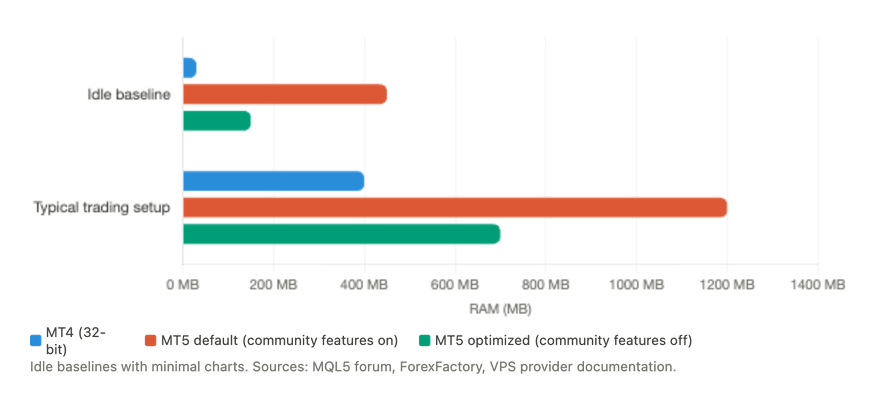
MT4’s idle footprint sits at 15 to 45 MB per terminal with minimal charts and low max bars settings. This figure is consistent across MQL5 forum reports spanning 2011 to 2022, ForexFactory threads, and VPS provider documentation. One ForexFactory user running multiple terminals reported averages around 45 MB per instance. With charts and indicators loaded in a typical trading configuration, a single MT4 terminal consumes 200 to 500 MB depending on chart count and history depth.
MT5 starts substantially higher. With community features enabled (economic calendar, MQL5 Market, Signals service, news feed), users consistently report 400 to 500 MB per terminal before opening a single chart. Disabling those features drops the baseline to roughly 100 to 200 MB, though precise before-and-after measurements from controlled tests are scarce.
The explanation for this gap comes from the most authoritative source available: MetaQuotes CEO Renat Fatkhullin, in a 2018 MQL5 forum post. He stated that MT4 was built during a period of “serious memory deficit” in 2004, designed to operate within tight constraints. MT5, by contrast, was engineered to “use the available memory, rather than trying to shrink to 100-200 MB,” with an emphasis on maximizing caches. He noted that MT5 targets machines with 2 to 64 GB of RAM and 4+ cores, and that MT5 handles roughly ten times more data than MT4.
This is not a bug or inefficiency. It is a design philosophy. MT5 trades memory for speed and data richness. On a desktop with 16 GB of RAM, this tradeoff is invisible. On a 2 GB VPS where 800 MB to 1.2 GB goes to Windows Server before MetaTrader even launches, it determines whether your setup runs or crashes.
Why the architectures consume memory differently
The data storage model explains most of the gap. MT4 stores each timeframe independently as separate .hst files. If you open only H1 charts, only H1 data loads into memory. The platform loads exactly what you ask for and nothing more.
MT5 maintains a unified M1 bar database plus tick data. All 21 timeframes are constructed on demand from this M1 base. When your EA requests H4 bars, MT5 builds them from stored M1 data and holds the constructed timeseries in memory. This means MT5 always loads the full M1 base regardless of which timeframe you display. The platform documentation states cached data is released “if not called for a long time,” but developers consistently report this mechanism is unreliable during active trading where data is accessed continuously.
The setting that closes most of the gap
The “Max bars in chart” setting has more impact on both platforms’ memory than any other single variable. On MT4, reducing this from the default 512,000 to 5,000 across 23 pairs dropped memory from over 1 GB to roughly 25 MB in documented ForexFactory tests. One user measured a drop from 182 MB to 74.5 MB on a single terminal by lowering this value alone.
The same optimization applies to MT5, though the absolute savings are harder to quantify because MT5’s M1 base and tick database persist independently of chart history depth. The practical recommendation is the same: set max bars to 5,000 to 10,000 for VPS operation. Pattern scanners and most EAs need at most a few hundred bars of lookback. VPS providers like Hyonix recommend 5,000 as the minimum viable setting.
Per-indicator overhead differs significantly
Each indicator on MT4 allocates roughly 1 MB per buffer at 200,000 bars, plus an internal rate snapshot adding approximately 10 MB per indicator per chart. One forum user demonstrated that consolidating 15 indicators into fewer files halved memory consumption from over 1 GB to 750 MB across 8 charts.
MT5’s handle-based iCustom() approach provides a meaningful optimization that MT4 cannot match. When multiple EAs on the same symbol and timeframe request identical indicators with identical parameters, MT5 calculates the indicator once and shares the result. MT4 creates separate calculations for each call, duplicating both memory and CPU work. However, MT5 developers must explicitly call IndicatorRelease() to free indicator handles when they are no longer needed, or memory leaks accumulate over time.
MT4’s hard ceiling vs MT5’s open architecture
MT4 is a 32-bit application with a practical per-process memory limit of approximately 2 GB on 64-bit Windows. One MQL5 forum developer reported that “the terminal crashes when hitting 2 GB even in W64,” and another documented instability at 2.1 GB with 20 charts and complex algorithms. This ceiling means that no matter how much RAM your VPS has, a single MT4 instance cannot use more than roughly 2 GB before becoming unstable.
MT5’s 64-bit architecture has no such limit. For traders running complex multi-indicator strategies, neural network EAs, or heavy data processing that pushes individual terminal memory consumption past 1.5 GB, MT5 is the only viable platform.
One important contradiction in the data
MQL5 forum moderator Alain Verleyen posted a screenshot in 2018 showing MT5 using less memory than MT4 under identical conditions. This conflicts with the majority of user reports showing MT5 using 3 to 20x more. The most likely reconciliation: with community features disabled, low max bars settings, and identical chart counts, MT5 can approach MT4’s footprint. But default configurations wildly favor MT4’s parsimony, and most traders comparing the two platforms are comparing defaults.
Threading and CPU: Both Are Multi-Threaded, But Differently
The claim that “MT4 is single-threaded” appears on nearly every MT4 vs MT5 comparison page on the web. It is an oversimplification that leads to poor VPS sizing decisions.
MetaQuotes developer Slawa confirmed on the official MQL5 forum that MT4 allocates separate threads for each EA and script, with additional dedicated threads for data pumping, the UI, and three trading operation threads (manual, trailing stops, automated). MT4 is multi-threaded. What it is not is parallel in the ways that matter most for VPS performance.
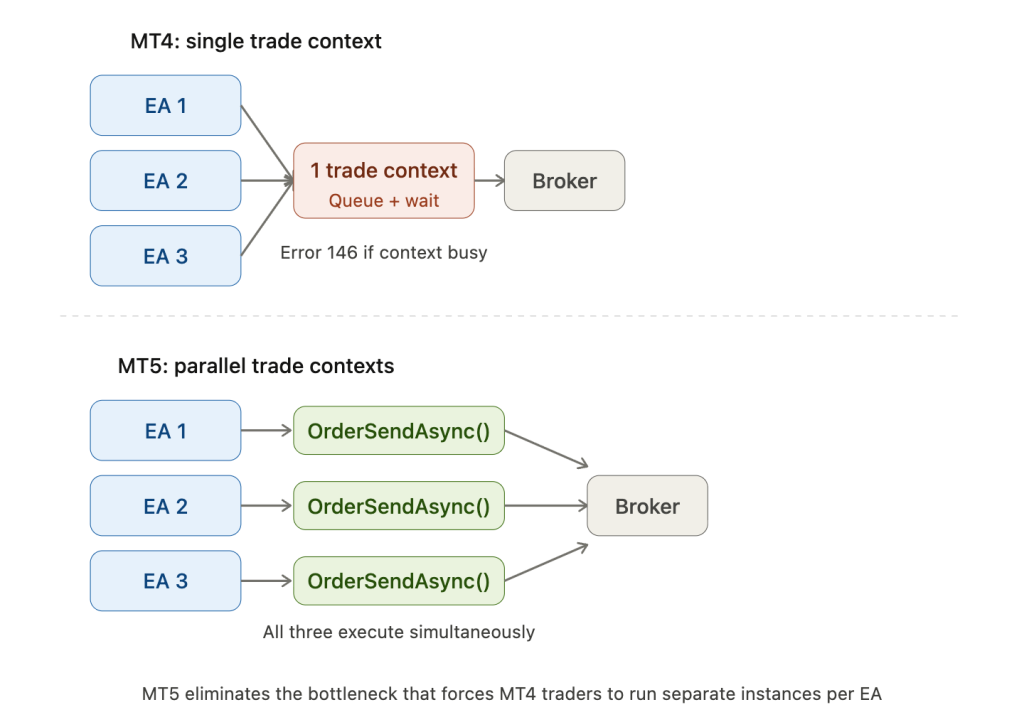
Two bottlenecks define MT4’s threading limitations. First, indicators on the same symbol share a single thread. A computationally heavy custom indicator blocks every other indicator on that symbol until it finishes calculating. Second, all trade execution funnels through one shared trade context. When multiple EAs attempt to send orders simultaneously, they queue behind each other, producing the infamous Error 146 (“Trade Context Busy”). On a VPS running 5 to 10 EAs that all react to the same market event, this serialization means only one EA trades at a time while the others wait.
MT5’s threading model is structurally similar but removes the trade execution bottleneck. Each EA still gets its own thread. Indicators on the same symbol still share a thread. The critical advancement is that multiple EAs can send trade requests simultaneously without waiting for a shared context. For multi-EA VPS deployments where several strategies might fire orders during the same news spike or session open, this eliminates a real failure mode that MT4 traders work around by running separate terminal instances.
CPU usage during live trading is minimal on both platforms
Under normal market conditions, neither platform stresses a modern VPS CPU. One experienced MQL5 developer reported running 11 live MT4 accounts on an 800 MHz Pentium III laptop for nearly two years at under 10% CPU utilization. Another user ran 60+ MT4 charts with nine indicators per chart averaging 15% CPU on a 4-core laptop. VPS provider FXVPS.biz documents 10 to 30% average CPU for 1 to 3 MT5 terminals during normal trading hours.
During news events and high tick volume periods, both platforms spike to 50 to 60% CPU as tick processing surges 5 to 10x above baseline. MT5 can spike higher because it processes more data streams (market depth, tick data, calendar events) alongside the standard price feed.
For live trading VPS planning, CPU is rarely the constraint. RAM is. The exception is during major news events when every EA on the terminal activates simultaneously, and on shared VPS plans where the “noisy neighbor” problem means every trader on the physical host demands CPU at the same moment.
The strategy tester is where CPU architecture diverges completely
MT4’s strategy tester is single-threaded without exception. Both individual backtests and optimization passes run sequentially on one core. This is confirmed by MetaQuotes developers, multiple forum moderators, and is an architectural limitation that will never change. MT4 is end-of-life and receives no new development.
MT5’s individual backtests also run on a single core, because sequential market simulation cannot be parallelized. But optimization is where MT5 transforms the equation. MT5 distributes optimization passes across all available CPU cores via testing agents, one agent per physical core by default. The official MetaQuotes benchmark demonstrated a 147x speedup using cloud agents on a large optimization task.
The VPS implication is direct. If you optimize strategies as part of your workflow, MT5 on a multi-core VPS delivers orders-of-magnitude faster results. But optimization should never run on a live trading VPS. Each MT5 optimization agent can consume approximately 2 GB of RAM and will use 100% CPU across all available cores. This is unanimous guidance across VPS providers and confirmed by MetaQuotes’ own built-in VPS service, which explicitly disables the strategy tester. Run optimization on a separate, dedicated instance.
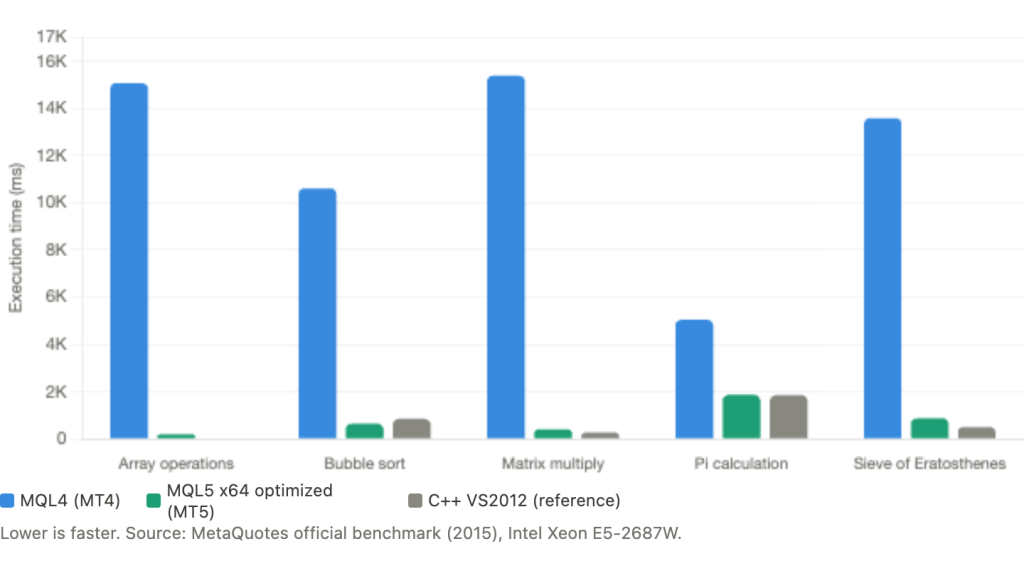
MQL5 code runs 2 to 10x faster than MQL4
MetaQuotes published official compiler benchmarks in 2015 comparing execution speed. On array operations, MT4 took 15,063 ms where MT5’s optimized 64-bit compiler completed the same task in 203 ms. On bubble sort, MT4 needed 10,609 ms versus MT5 at 656 ms. On matrix multiplication, 15,375 ms versus 422 ms. MQL5’s compiler matched or beat C++ (VS2012) on two of the benchmark tests.
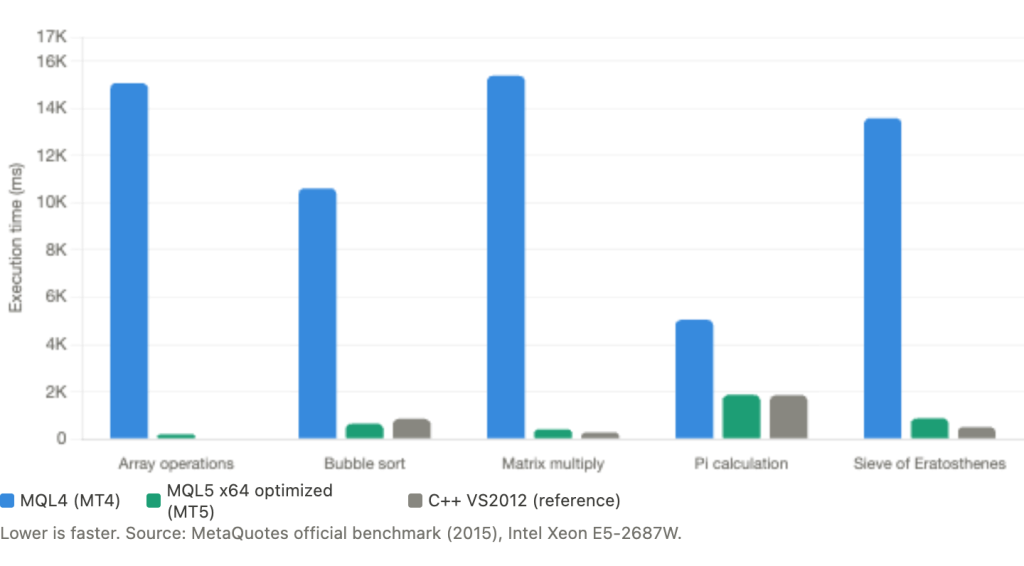
An independent community test confirmed the pattern, showing MQL5 computing primes 2.67x faster than MQL4.
For VPS resource planning, faster code execution means less CPU time per tick event. An EA that processes each tick in 0.5ms on MT5 versus 3ms on MT4 produces identical trading results but leaves substantially more CPU headroom for other terminals or for handling tick volume spikes. This advantage compounds on a shared VPS where CPU cycles are a limited resource.
One nuance traders should know: MT5 backtesting can appear slower than MT4 despite faster code execution. This is because MT5 uses real broker tick data for simulation while MT4 generates synthetic ticks from OHLC bars. MT5 processes far more data points per backtest for greater accuracy, not because the platform is slower.
Multi-Instance Capacity on a VPS
Running multiple MetaTrader terminals on a single VPS is standard practice for traders managing several broker accounts, separating strategy types, or isolating live trading from demo testing. The two platforms handle multi-instance operation very differently, and the difference affects both capacity and configuration complexity.
MT4 multi-instance setup is straightforward. Install each instance to a separate directory, and each operates independently with no special configuration required. There are no AppData conflicts, no shared state between instances, and no flags to remember. Multiple instances connecting to the same broker account work without restrictions. Windows imposes a theoretical limit of 32 terminal instances per user session, though MQL5 forum developer Fernando Carreiro reports the practical maximum is typically 24 to 28 instances. For traders who need more, EA-Coder.com documents clients running 100+ MT4 instances using multiple Windows user accounts to bypass the per-session limit.
MT5 requires the /portable flag for multi-instance operation. Without it, MT5 stores all user data in a shared AppData directory. If you install two MT5 terminals for the same broker without portable mode, they write to the same data folder and corrupt each other’s configuration. With /portable, each instance keeps data in its own installation directory, eliminating conflicts. This is not optional for VPS deployments running more than one MT5 terminal.
One practical concern with MT5: newer builds consume more resources per instance. One forum user documented running 25 MT5 instances on build 2715, but after upgrading to build 3552, the practical maximum dropped to 20 instances despite CPU sitting at only 15% and RAM at 30%. Platform updates can silently reduce your VPS capacity if you are running near the limit.
VPS tier capacity planning
The following estimates draw from ForexVPS.net, AccuWebHosting, MassiveGRID, WinnerVPS, and FXVM documentation. They assume optimized configurations: max bars reduced, Market Watch cleaned, and unnecessary features disabled.
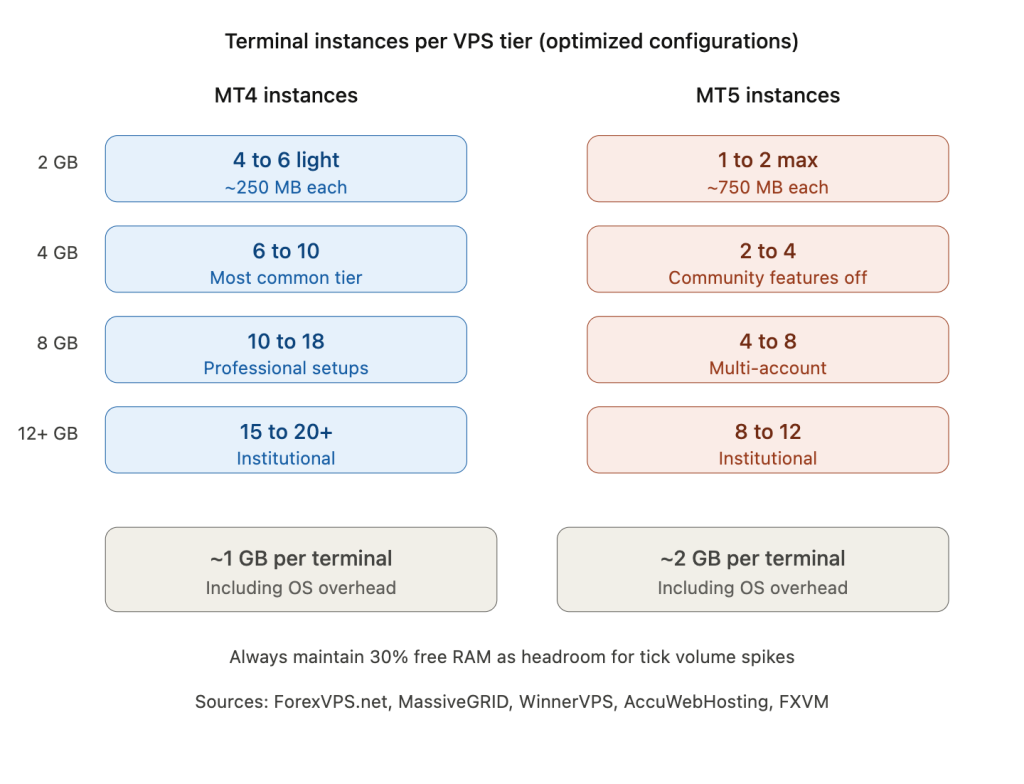
On a 2 GB VPS, expect to run 4 to 6 light MT4 instances or 1 to 2 MT5 instances at most. After Windows Server claims 800 MB to 1.2 GB, the remaining memory is tight for anything beyond minimal setups.
On a 4 GB VPS, the most common tier for solo traders, 6 to 10 MT4 instances or 2 to 4 MT5 instances is realistic. This assumes each terminal runs a moderate number of charts with simple EAs, not heavy multi-indicator scanning workloads.
On an 8 GB VPS, capacity scales to 10 to 18 MT4 instances or 4 to 8 MT5 instances. This tier supports multi-account professional setups where several broker relationships run simultaneously.
At 12+ GB, you can run 15 to 20+ MT4 instances or 8 to 12 MT5 instances. This is institutional territory where traders manage large portfolios across multiple brokers and strategy types.
The rule of thumb across providers is consistent: budget approximately 1 GB per MT4 terminal or 2 GB per MT5 terminal, inclusive of OS overhead, and maintain at least 30% free RAM as headroom. Memory scaling is approximately linear with instance count because each terminal operates independently, though the OS overhead is shared and does not multiply.
MassiveGRID provides more granular figures: MT4 idles at 150 to 200 MB per instance with an additional 30 to 50 MB per chart with indicators. MT5 ranges from 768 MB to 1.5 GB per instance depending on EA complexity and enabled features. These numbers align with the per-terminal figures from the RAM section and give a more precise basis for capacity planning than the round “1 GB / 2 GB per terminal” rule.
Why MT4 dominates multi-account VPS setups
The math is unforgiving. A trader managing 8 broker accounts on a 4 GB VPS can run all 8 as light MT4 instances with headroom to spare. The same trader on MT5 can run 2 to 3 instances before hitting the RAM wall. For prop firm traders managing multiple challenge accounts, copy trading operators running master-plus-follower setups, or signal providers mirroring across brokers, MT4’s 15 to 45 MB idle baseline is not a legacy limitation. It is a decisive infrastructure advantage that MT5 cannot match regardless of optimization.
This is likely one reason MT4 persists in active use despite MetaQuotes ending new license distribution in 2018. The platform’s resource efficiency on constrained VPS hardware creates a practical barrier to migration that feature comparisons do not capture.
Storage Architecture and Disk I/O
How each platform stores and retrieves historical data affects disk space consumption, startup time, and ongoing I/O load during live trading. On a VPS with limited SSD allocation, these differences matter.
MT4 stores historical data as separate .hst files per timeframe per symbol. Each file contains uncompressed binary records at roughly 60 bytes per bar. With 9 standard timeframes, the same price data is effectively stored 9 times in different resolutions. A typical broker offering 50+ symbols can generate several gigabytes of .hst files over time. The upside: MT4 reads pre-built files directly into memory with minimal processing. Startup is fast, and disk I/O during operation is predictable.
MT5 takes a fundamentally different approach. Price data is stored in compressed HCC files containing packed M1 minute bars, one file per symbol per year. All 21 timeframes are constructed on demand from this M1 base into HC cache files stored in a /cache subdirectory. MetaQuotes describes HCC as “a very efficient compression format” that dramatically reduces both disk footprint and network traffic during history downloads. For equivalent symbol sets, MT5’s compressed storage is more space-efficient than MT4’s duplicated .hst files.
The tradeoff is that MT5 must decompress HCC data and construct timeframes at startup. This makes disk I/O speed directly impact chart loading time and terminal readiness. On spinning disk, initial chart loading for 20+ symbols can take minutes. On NVMe, the same operation completes in seconds. ForexVPS.net recommends storage with “good IOPS (targeting >5000) to handle tick data, historical data downloads, and journal/log writes without freezing the UI.”
MT5 also maintains a tick database in TKC files that MT4 does not store at all. This tick data is essential for MT5’s accurate backtesting but adds storage that grows continuously. The Strategy Tester has been reported generating over 100 GB of temporary files during heavy optimization runs, which is another reason optimization should never run on a live trading VPS with limited disk allocation.
Log files are the silent disk killer on both platforms
Normal trading generates a few megabytes of log data daily on either platform. But backtesting with verbose Print() output or running many terminals with active journaling can produce extreme growth. One ForexFactory user reported a single 20 GB log file from a backtesting session that filled the entire C: drive. Both platforms support MaxLogFileSize and MaxLogFiles parameters in terminal.ini for controlling growth, and scheduled log cleanup should be part of any VPS maintenance routine.
For VPS storage planning: NVMe is strongly recommended for both platforms and practically required for MT5. Budget disk space not just for installation and history data but for log accumulation and, if applicable, tick database growth over weeks and months of continuous operation.
Network, Execution Model, and Memory Management
Both platforms communicate over proprietary encrypted TCP protocols using port 443. Despite using the same port as HTTPS, neither platform uses standard SSL/TLS for its trading connection. This is relevant for VPS firewall configuration: allow terminal.exe outbound on port 443, and the trading connection works without additional rules.
Bandwidth consumption
MT4’s network footprint is remarkably small. One MQL5 forum user measured approximately 90 MB per week with 28 open charts running 24/5, translating to roughly 0.4 KB/s of sustained throughput. On any modern VPS plan, MT4’s bandwidth consumption is effectively invisible.
MT5 consumes more bandwidth because it maintains additional data streams beyond price quotes: the economic calendar, news feed, market depth, MQL5 Market thumbnails, Signals service synchronization, and tick data streaming. Each of these can be disabled individually in VPS deployments, and they should be. With all community features disabled, MT5’s bandwidth approaches MT4’s, though the tick data stream still adds overhead that MT4 does not generate.
For VPS plans with bandwidth caps, neither platform is likely to exceed limits under normal trading conditions. The concern is more relevant during heavy history downloads after a fresh installation or reconnection, where both platforms can briefly consume significant bandwidth while catching up on missed data.
Order execution architecture
The execution model difference has direct consequences for multi-EA VPS setups.
MT4’s OrderSend() is synchronous and blocking. When an EA sends an order, the entire EA thread waits for the broker’s response before executing any further code. Combined with MT4’s single trade context, this means only one EA across the entire terminal can execute a trade at any given moment. Every other EA attempting to trade receives Error 146 and must retry. During fast-moving markets when multiple EAs trigger simultaneously, this serialization causes missed entries and delayed execution.
The standard workaround is running each EA on a separate MT4 terminal instance. This eliminates the trade context conflict because each terminal has its own independent context, but it multiplies resource consumption by the number of instances.
MT5 addresses this at the architectural level. OrderSendAsync() dispatches the trade request and returns immediately, freeing the EA to continue processing while the broker handles the order. Multiple EAs can send trade requests simultaneously without blocking each other. For a VPS running a portfolio of strategies that might all react to the same market event, this removes a bottleneck that MT4 solves only through resource-expensive instance multiplication.
Memory growth and long-running stability
Both platforms exhibit memory growth during extended continuous operation, and both require the same operational response: scheduled weekly restarts during the weekend market close.
MT4 accumulates new bars in memory without releasing them until the terminal restarts. One user documented growth from 30 MB to 500 MB over four weeks of continuous operation. WinnerVPS, drawing from operational data across many client terminals, warns that “true memory consumption only becomes visible 12 to 24 hours after MT4 starts running.”
MT5’s memory growth has different causes but the same practical outcome. Cached timeseries persist in memory for up to 30 minutes after last access according to documentation, but under active trading conditions where data is accessed continuously, these caches effectively become permanent residents. MT5’s automatic garbage collection releases dynamically allocated memory “immediately after exiting event handling functions,” which helps with EA-level memory management. But platform-level accumulation from tick history, indicator caches, and log buffers still drives growth over days of operation.
MT5’s indicator handle system introduces a memory management responsibility that MT4 does not have. The iCustom() handle-based approach reuses indicator calculations across EAs, which saves memory when implemented correctly. But developers who create indicator handles without calling IndicatorRelease() accumulate orphaned calculations that persist until the terminal restarts. Poorly written MT5 EAs can leak memory faster than poorly written MT4 EAs because of this mechanism.
The operational recommendation is identical for both platforms: restart terminals weekly during the weekend market close, clean log files on the same schedule, and monitor RAM usage at the 12 to 24 hour mark rather than at startup.
Deployment and Optimization Differences on VPS
Several VPS optimization steps apply identically to both platforms: reduce Market Watch to only traded symbols (documented 20 to 40% CPU reduction), set the power plan to High Performance, add Windows Defender exclusions for MetaTrader installation folders, and disable unnecessary Windows services (Print Spooler, Windows Search, SysMain). These are covered in detail in our MT4 VPS optimization guide. This section focuses on where the two platforms require different configuration.
MT5 community features: the 300 to 400 MB you can reclaim
The single most impactful MT5-specific optimization is disabling community features that have no purpose on a headless VPS. Five features account for nearly all of the gap between MT5’s minimal and default RAM footprint:
The MQL5 Market tab downloads application thumbnails and descriptions. The Signals service synchronizes copy trading data. The News feed continuously downloads text and images. The Economic Calendar maintains event data (disable unless your EA specifically requires it). The MQL5 Community chat maintains a real-time messaging connection.
Disabling all five drops MT5’s baseline from 400 to 500 MB to roughly 100 to 200 MB. This is the single configuration change that makes MT5 viable on constrained VPS plans. On a 4 GB VPS, reclaiming 300 MB per terminal across 3 instances frees nearly 1 GB of headroom.
Portable mode: essential for both, mandatory for MT5 multi-instance
Both platforms should run in portable mode (/portable flag) on any VPS to prevent data folder mismatches after reboots. The mechanism and failure mode are identical: without portable mode, MetaTrader stores data in a user-profile-dependent AppData path that can resolve differently depending on how the desktop session was created.
For MT4, portable mode is a best practice that prevents problems. For MT5, it is a hard requirement if you run more than one instance for the same broker. Without /portable, multiple MT5 installations write to the same shared AppData directory, causing configuration corruption. Every MT5 instance on a VPS must have its own installation directory and its own /portable shortcut.
Auto-start configuration
The research for this article surfaced a difference from our previous guidance worth noting. The standard recommendation for MT4 VPS deployment is Autologon combined with the Windows Startup folder. This works reliably because Startup folder items execute after the user session loads.
However, multiple sources in the MT5 VPS provider ecosystem recommend Task Scheduler with an “At system startup” trigger as more robust than the Startup folder, particularly for MT5 deployments where portable mode and multiple instances add complexity. The Startup folder requires user logon (handled by Autologon), while Task Scheduler can be configured to run whether or not a user is logged on. The caveat documented in article 1 still applies: MetaTrader running under the SYSTEM account in Session 0 fails to load user profiles correctly. The workaround is configuring the task to run under the Administrator account with “Run only when user is logged on” and combining it with Autologon, which provides the interactive session.
Either approach works. The important point is that whichever method you choose must include a 60 to 120 second startup delay to allow Windows services and network connectivity to initialize before MetaTrader launches.
Windows Server compatibility
Both platforms run on Windows Server 2019 and 2022 without issues. MT4 remains compatible with older Server versions, reflecting its 2005-era design.
MT5 has a harder requirement: 64-bit Windows exclusively since build 3930 (September 2023). 32-bit support ended January 1, 2024. Windows Server 2012 is no longer reliably compatible with current MT5 builds. If you are setting up a new VPS for MT5, confirm the provider installs Server 2019 or 2022.
Never run backtesting on a live trading VPS
This point belongs in the deployment section because it is an operational discipline issue, not a platform feature. MT5’s multi-core strategy tester is powerful, but each optimization agent consumes approximately 2 GB of RAM and drives CPU to 100% across all cores. Running an optimization while EAs are live trading will degrade execution quality, potentially causing missed trades, delayed order fills, or terminal freezing.
This guidance is unanimous across every VPS provider surveyed and is confirmed by MetaQuotes’ own built-in VPS service, which explicitly disables the strategy tester. If optimization is part of your workflow, run it on a separate VPS instance or schedule it exclusively during the weekend market close.
Which Platform to Choose Based on Your VPS
The data from the preceding sections points to clear decision criteria. Rather than declaring one platform “better,” the right choice depends on which infrastructure constraint matters most for your specific setup.
Choose MT4 if you are running many terminals on limited RAM. A trader managing 6 to 10 broker accounts on a 4 GB VPS has no realistic alternative. MT4’s 15 to 45 MB idle baseline means 8 light instances consume roughly 360 MB of platform overhead before charts and EAs. The same 8 instances on MT5, even fully optimized, consume 800 MB to 1.6 GB of platform overhead alone. For prop firm traders running multiple challenge accounts, copy trading operators with master-plus-follower configurations, or signal providers mirroring across brokers, MT4 is not a legacy choice. It is the only platform that fits the hardware budget.
Choose MT4 if your EAs are simple and your priority is resource efficiency. A moving average crossover on 5 pairs, a breakout strategy on H4, a grid bot on a single symbol. These workloads do not benefit from MT5’s architectural advantages. They run identically on both platforms, but MT4 runs them in a fraction of the memory. If your strategy does not push past 1.5 GB of per-terminal memory and you do not need multi-core optimization, MT4 delivers the same trading result at lower infrastructure cost.
Choose MT5 if your strategy pushes against the 2 GB memory ceiling. Complex multi-indicator setups, neural network EAs, or scanners loading data for hundreds of symbols can approach MT4’s hard 2 GB per-process limit. MT5’s 64-bit architecture removes this ceiling entirely. If your MT4 terminal regularly exceeds 1.5 GB of RAM usage, migration to MT5 eliminates the risk of memory-related crashes.
Choose MT5 if strategy optimization is part of your workflow. MT4’s single-threaded tester means a 10,000-pass optimization runs sequentially on one core. MT5 distributes those passes across every available core, with documented speedups of 147x using cloud agents. If you iterate on strategy parameters regularly, the time savings from MT5’s parallel tester are transformative. Use a separate VPS for optimization and keep the live trading instance lean.
Choose MT5 if you run multiple EAs that trade simultaneously. MT4’s single trade context forces EAs to queue behind each other during order execution. On a terminal running 5 to 10 EAs that all react to the same market event, this serialization causes missed entries. MT5’s parallel trade contexts let multiple EAs send orders at the same time. If your alternative on MT4 is running each EA on a separate terminal instance to avoid Error 146, MT5 may actually use less total RAM by consolidating everything into fewer instances with parallel execution.
Choose MT5 if you are starting fresh and planning for long-term infrastructure. MetaQuotes stopped distributing new MT4 broker licenses in 2018. Existing brokers continue to support MT4, and the platform receives maintenance updates, but no new development is happening. MT5 is where MetaQuotes invests all engineering effort. Broker support for MT4 is not guaranteed indefinitely. If you are building a new trading infrastructure from scratch rather than optimizing an existing one, MT5 is the forward-looking choice despite its higher resource baseline.
The hybrid approach many traders miss. Nothing prevents running both platforms on the same VPS. A common configuration uses MT4 for multi-account execution (where its low per-instance footprint matters) and a single MT5 instance for strategy development and optimization (where its multi-core tester and faster code execution matter). On an 8 GB VPS, a trader could run 6 to 8 MT4 live trading instances alongside one MT5 development terminal without resource contention during normal market conditions.
FAQ
How much RAM does each platform actually use with a typical trading setup?
A single MT4 terminal running 5 to 10 charts with a few indicators and one EA per chart consumes roughly 300 to 600 MB total with optimized max bars settings. The same configuration on MT5 with community features disabled consumes roughly 500 MB to 1.2 GB. These figures include platform overhead, chart data, and indicator buffers. Add 800 MB to 1.2 GB for Windows Server on top of whichever platform you choose.
Can I run MT4 and MT5 simultaneously on the same VPS?
Yes. They are completely independent applications with no shared resources or conflicts. A common configuration uses multiple MT4 instances for live execution across broker accounts and a single MT5 instance for strategy development or optimization. Budget RAM for each terminal independently. On an 8 GB VPS, running 6 light MT4 instances alongside 1 MT5 terminal is realistic with headroom.
Is MT4 still safe to use given that MetaQuotes stopped distributing it?
MetaQuotes stopped issuing new MT4 broker licenses in 2018, but the platform continues to receive maintenance updates and security patches. Brokers who already hold licenses continue offering MT4 to their clients. The risk is not immediate but long-term: if your broker eventually discontinues MT4 support, you will need to migrate. For traders building new infrastructure, this timeline uncertainty is worth considering. For traders with existing MT4 setups that work, there is no urgent reason to migrate purely based on license status.
Should I choose MT4 or MT5 for a MetaQuotes built-in VPS subscription?
MetaQuotes’ own VPS service ($12.80 to $15/month) runs a lightweight terminal without graphics, achieving roughly 80 MT5 instances per server in their infrastructure. It provides exceptional latency with 96% of broker servers reachable under 10 ms. The limitations are significant: no DLL support (which breaks many custom EAs), no strategy testing, one subscription per trading account, no Windows desktop access, and a maximum of 3 GB RAM. If your EA runs without DLL dependencies and you need only one account per VPS, it offers excellent value on either platform. For anything more complex, a full Windows VPS provides the flexibility that the built-in service cannot.
Does MT5 use more network bandwidth than MT4 on a VPS?
In default configuration, yes. MT5 streams additional data (calendar events, news, market depth, MQL5 Market content, Signals service) that MT4 does not. With all community features disabled, the difference narrows substantially, though MT5’s tick data stream still adds some overhead. In practical terms, neither platform’s bandwidth consumption is likely to exceed even the most restrictive VPS plan limits during normal trading. The concern is more about CPU cycles spent processing unnecessary data streams than about raw bandwidth.
Which platform recovers faster after a VPS reboot?
MT4 typically reaches a trading-ready state faster because it reads pre-built .hst files directly into memory without decompression. MT5 must decompress HCC data and construct timeframe caches from its M1 base, making startup time more dependent on disk speed. On NVMe storage, the difference is a few seconds. On spinning disk or slow SSD, MT5 can take noticeably longer to load charts for 20+ symbols. Both platforms restore EA attachments and chart configurations automatically after a graceful shutdown, provided portable mode is configured and the auto-start sequence includes an adequate delay for network initialization.
References
- Fatkhullin, R. (MetaQuotes CEO). MQL5.com forum post, 2018. Statements on MT4 vs MT5 design philosophy: “serious memory deficit” era for MT4, MT5 emphasis on “maximizing caches” targeting 2 to 64 GB systems, MT5 handling “ten times larger data than MT4.” The single most authoritative source on platform architecture differences.
- MQL5.com Forum. Developer Slawa (MetaQuotes): MT4 threading model confirmation (separate EA threads, three trading threads, shared indicator thread per symbol). Developer Fernando Carreiro: practical MT4 instance limit of 24 to 28 per session. Moderator Alain Verleyen: screenshot showing MT5 using less memory than MT4 under identical conditions (contradicts majority of reports). Moderator WHRoeder: “Max bars in chart determines starting RAM requirement.” User lippmaje: MT4 crashes at 2 GB practical limit. User tsunami80: MT5 instance capacity regression between builds 2715 and 3552.
- MQL5.com Documentation and Articles. “Parallel Calculations in MetaTrader 5”: empirical threading model verification (2 EAs = 2 cores, 2 indicators same symbol = 1 core). Official compiler benchmarks (2015, Intel Xeon E5-2687W): MQL4 vs MQL5 vs C++ execution speed comparisons. OrderSendAsync() documentation. iCustom() handle-based indicator sharing. IndicatorRelease() memory management. Automatic garbage collection behavior.
- ForexFactory Forum. User-documented RAM measurements: MT4 terminals averaging 15 to 290 MB per instance. Max bars reduction from 500,000 to 5,000 dropping memory from over 1 GB to approximately 25 MB across 23 M1 pairs. Single terminal drop from 182 MB to 74.5 MB. MT4 memory growth from 30 MB to 500 MB over four weeks. Log file reaching 20 GB during backtesting.
- VPS Provider Operational Documentation. ForexVPS.net: VPS tier capacity estimates, IOPS recommendation (>5000). MassiveGRID: per-instance resource figures (MT4 at 150 to 200 MB idle plus 30 to 50 MB per chart, MT5 at 768 MB to 1.5 GB). WinnerVPS: “true memory consumption only becomes visible 12 to 24 hours after MT4 starts running.” AccuWebHosting, FXVM, Hyonix: VPS tier recommendations and max bars configuration guidance. FXVPS.biz: 10 to 30% average CPU for 1 to 3 MT5 terminals.
- EA-Coder.com. Documentation of clients running 100+ MT4 instances using multiple Windows user accounts to bypass per-session limits.
- MetaQuotes Built-in VPS Service. Pricing ($12.80 to $15/month), architecture (approximately 80 MT5 instances per Xeon E5-1650 / 128 GB server), latency claims (96% of broker servers under 10 ms), limitations (no DLL support, no strategy testing, 3 GB RAM maximum, one account per subscription).
- MetaTrader 4 and MetaTrader 5 Platform Documentation. Portable mode data storage paths. HCC and HC cache file formats. Terminal.ini parameters (MaxLogFileSize, MaxLogFiles). MT5 64-bit requirement since build 3930 (September 2023). 32-bit support end date (January 1, 2024).
Editorial Note
This article compares MetaTrader 4 and MetaTrader 5 from a VPS infrastructure perspective: RAM consumption, CPU utilization, multi-instance capacity, storage behavior, and deployment configuration. It does not constitute a recommendation of either platform for trading purposes, nor does it provide financial advice or strategy guidance.
Resource figures are based on documented measurements from MQL5.com, MetaQuotes developer statements, VPS provider operational data, and community benchmarks. Actual consumption varies by broker data feed, EA complexity, indicator count, chart configuration, and platform build version. Figures should be treated as reference ranges for infrastructure planning, not guaranteed specifications.
Where sources contradict each other, both positions are presented with attribution. The contradiction between Alain Verleyen’s measurement and the majority of user reports is noted explicitly because transparency about conflicting data builds more reliable decision-making than presenting only the majority view.
MetaQuotes stopped issuing new MT4 broker licenses in 2018. Existing broker support continues as of the date of this article but is not guaranteed indefinitely. Traders should verify MT4 availability with their specific broker before making long-term infrastructure commitments based on the platform.