Day
Hrs
Mins
Secs

⚡ Flash Sale. Grab an extra 15% off annual Forex VPS plans. 40% total savings. Code: FLASHTRADE

17. How to Use Multiple Monitors on VPS?

If you’re using multiple monitors on your system setup and you regularly connect to other systems via Remote Desktop, you know how frustrating it is to go from a multiple-monitor display to a single-monitor display for your remote connection. If so, you’ll definitely want to learn how you can take advantage of multiple monitors using Remote Desktop Connection on Windows 10 

However, before we go any further it is important to understand right off the bat that multiple-monitors support is available only on Windows 10 Pro and Windows 10 Enterprise editions.

To begin, launch Remote Desktop Connection and select the system you want to connect to with multiple-monitor support from the Computer drop-down list. Then, click the Options button to expand the Remote Desktop Connection window so that you can see all the tabs. Next, choose the Display tab and select the Use All My Monitors for the Remote Session check box, as shown in Figure A. To complete the procedure, return to the General tab and click the Save button.

Figure A
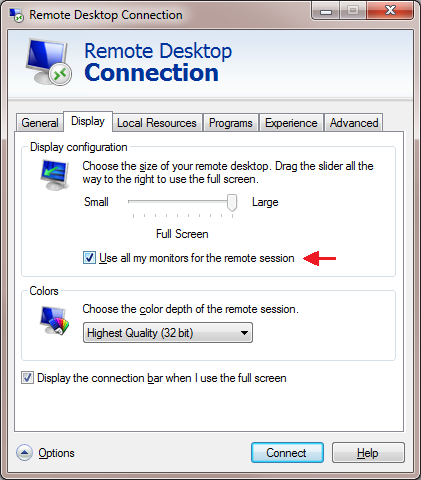
Selecting the Use All My Monitors for the Remote Session check box is all that is needed to enable the multiple-monitor feature. When you connect to the remote system, the remote system’s monitor will instantly fill your multiple monitors, just as if it were physically connected to the monitors.

About The Author
Stay on top of everything

Subscribe to our newsletter

Halloween deal

20% off

your first month

Forex VPS near your broker.

Offer ends in
Days
Hours
Min
Sec

New York it is. Where should we send your code?

You get the code by email within a minute. We use your address to send the code and, if you tick the box, occasional offers. Unsubscribe anytime.

Halloween deal

20% off

your first month

Forex VPS near your broker.

Offer ends in
Days
Hours
Min
Sec

London it is. Where should we send your code?

You get the code by email within a minute. We use your address to send the code and, if you tick the box, occasional offers. Unsubscribe anytime.

Halloween deal

20% off

your first month

Forex VPS near your broker.

Offer ends in
Days
Hours
Min
Sec

Amsterdam it is. Where should we send your code?

You get the code by email within a minute. We use your address to send the code and, if you tick the box, occasional offers. Unsubscribe anytime.

Halloween deal

20% off

your first month

Forex VPS near your broker.

Offer ends in
Days
Hours
Min
Sec

Your Hong Kong code is almost ready

You get the code by email within a minute. We use your address to send the code and, if you tick the box, occasional offers. Unsubscribe anytime.

Halloween deal

20% off

your first month

Forex VPS near your broker.

Offer ends in
Days
Hours
Min
Sec

Pick your VPS location to get your 20% code

We send the code to your email. Choose the city closest to your broker.